Flow AI Review 2026: LinkedIn Outreach, MCP, Pricing + $935 Bonuses
Flow AI Review 2026: Can It Turn LinkedIn Outreach Into a More Manageable Pipeline?
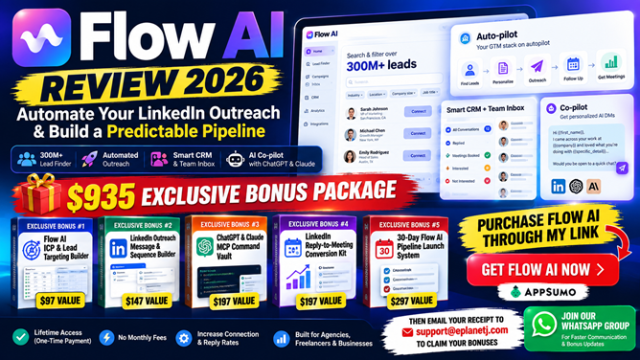
A detailed look at Flow AI's 300M+ profile search, LinkedIn outreach automation, unified inbox, Co-pilot, CRM, analytics and ChatGPT/Claude MCP — plus my 5-bonus Flow AI LinkedIn Pipeline Accelerator with a combined suggested value of $935.
SEE FLOW AI ON APPSUMO → SEE MY 5 EXCLUSIVE BONUSES ↓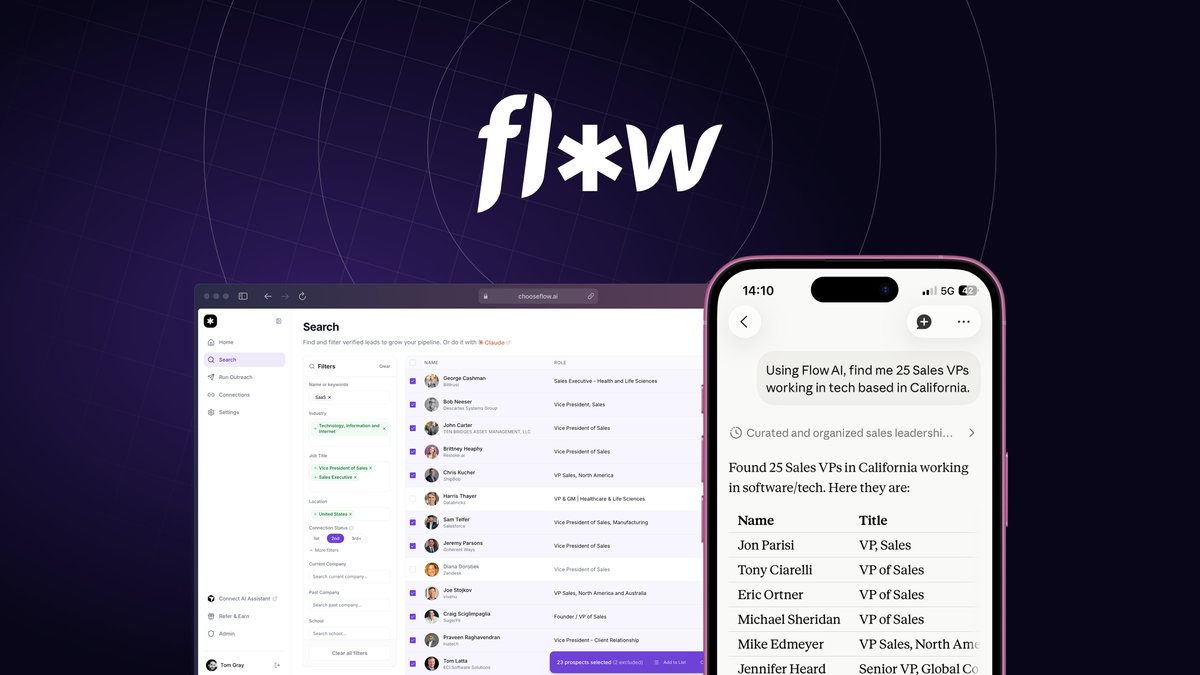
Quick Answer
Flow AI is an all-in-one LinkedIn prospecting and outreach platform aimed at people who want to find prospects, launch outreach, manage replies and use AI assistants inside the workflow. The current AppSumo offer advertises a 300M+ profile database, Lead Finder, Auto-pilot, Co-pilot, CRM, unified inbox, analytics and LinkedIn MCP integrations. It is most relevant if LinkedIn is already an important B2B acquisition channel for you. It is less compelling if you rarely prospect on LinkedIn or expect automation alone to fix weak targeting, messaging or an unclear offer.
What I'll Cover
Flow AI Sales-Page Video
I checked the live AppSumo sales page before this update. I could verify the official product images below, but the page did not expose a Flow AI product/demo video in the sales-page content available to me. I have therefore not inserted an unrelated YouTube video or invented a video embed. If Flow AI adds an official sales/demo video later, this section is ready to be replaced with that verified embed.
What Is Flow AI?
Flow AI is designed to consolidate several pieces of LinkedIn prospecting into one system. Instead of using one product to source prospects, another to automate connection activity, spreadsheets to track replies, and separate AI tools for drafting responses, Flow AI brings those functions together around a LinkedIn-focused workflow.
The current AppSumo listing describes the product around four core jobs: finding targeted prospects from a database of more than 300 million profiles, running LinkedIn outreach sequences, centralizing replies in a shared inbox/CRM, and drafting smarter responses with Co-pilot. Flow AI also puts unusual emphasis on MCP connectivity, allowing supported AI assistants such as ChatGPT and Claude to interact with Flow workflows.
Flow AI AppSumo Lifetime Offer
Use the button below to inspect the current deal, features, terms and live pricing. Deal terms can change, so the checkout page should be treated as the final source for what you are buying.
CHECK THE CURRENT FLOW AI DEAL →How Flow AI Fits Together
The easiest way to understand Flow AI is as a pipeline: find → reach → reply → organize → improve. The Lead Finder builds the prospect pool. Auto-pilot handles repeatable outreach steps. The unified inbox and CRM organize conversations. Co-pilot helps draft replies. Analytics show what is happening. MCP can expose parts of that workflow to an AI assistant.
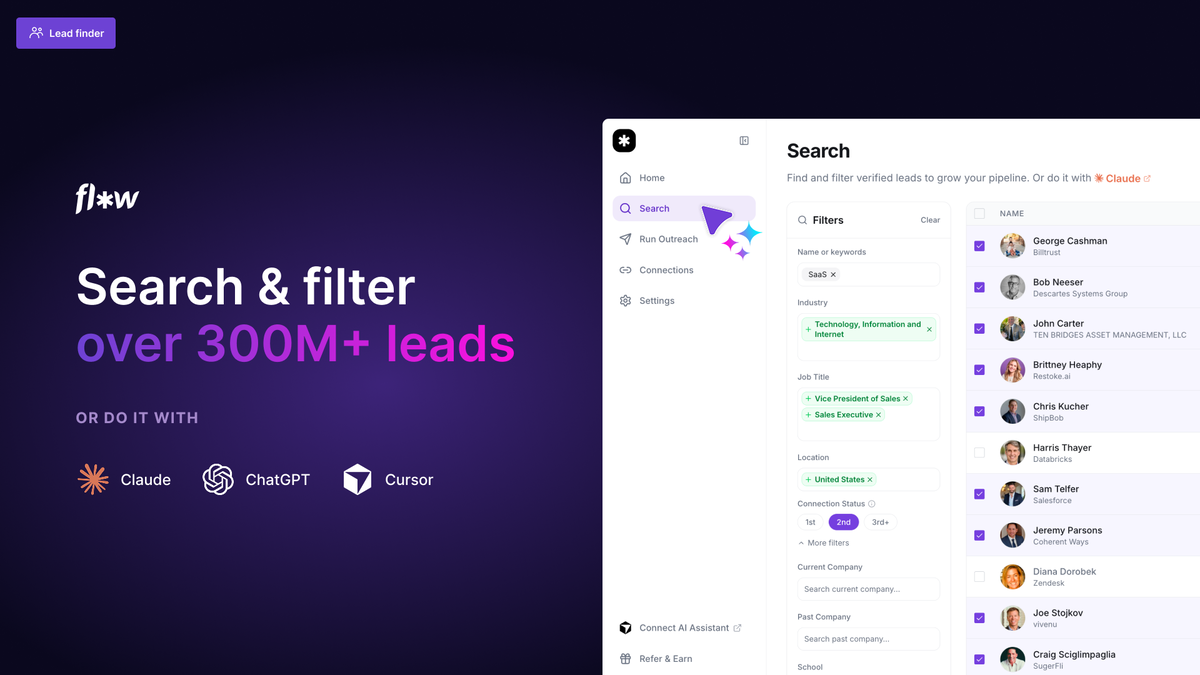
1. Lead Finder: Start With the Right People
Flow AI's sales material says users can search a 300M+ profile database by role, industry, company size and location. It also promotes natural-language prospecting: describe the ideal buyer and let the AI help identify matching profiles. For a salesperson or agency, that potentially reduces dependence on a separate lead database for basic LinkedIn prospecting.
The important qualifier is that database size does not automatically equal lead quality. A large database is useful only when you have a reasonably clear ideal customer profile. That is why the first bonus in my package is an ICP & Lead Targeting Builder: it addresses the strategy that has to come before the search box.
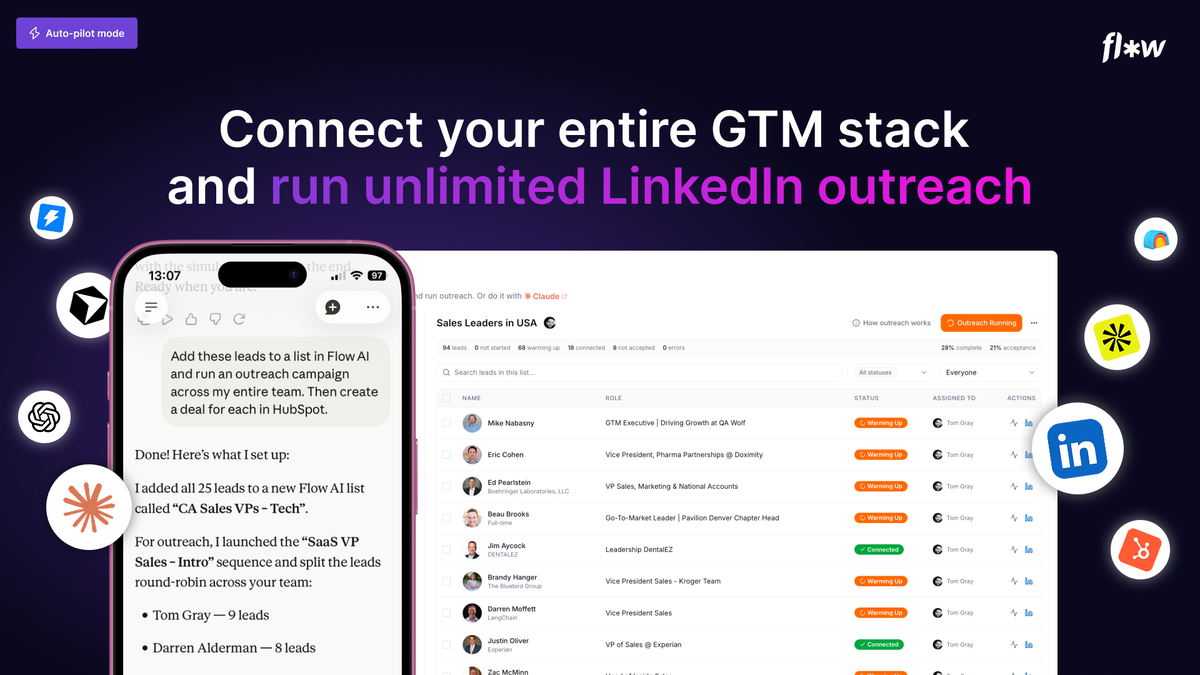
2. Auto-pilot: Automate the Repetitive Outreach Layer
Flow AI promotes outreach sequences that can include actions such as profile visits, likes and connection requests. The vendor describes its approach as operating at a human pace and using guardrails. That is useful context, but no third-party automation can make LinkedIn account risk disappear. Platform rules and limits can change, and users should monitor current LinkedIn and Flow AI guidance.
Automation is also not a substitute for relevance. If the wrong prospects receive generic messages, automating the process simply makes the wrong process happen faster. A sensible implementation starts with a small test segment, observes connection and reply behavior, and improves the targeting/message before expanding.
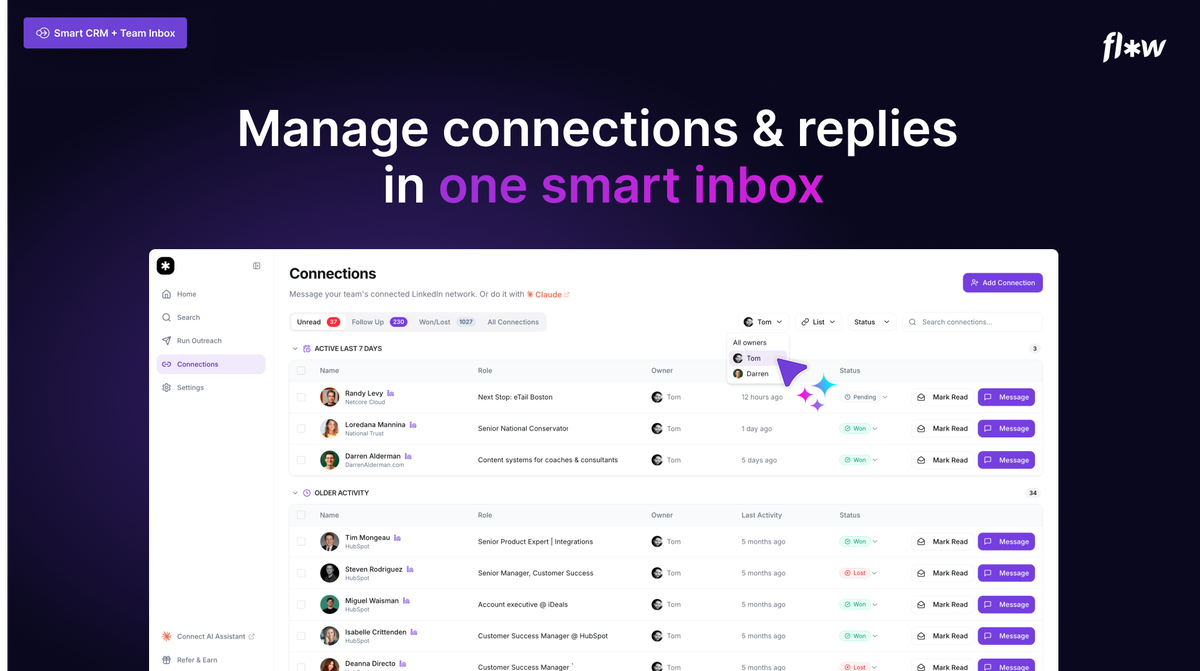
3. Unified Inbox + CRM: Keep Replies From Getting Lost
Once outreach begins, the operational problem changes. You no longer need more prospects; you need to know who replied, who owns the conversation, who needs follow-up and what the next action is. Flow AI's shared inbox is designed to bring conversations from connected accounts into one place, while the CRM layer tracks status and follow-up.
This is especially relevant to teams and agencies. The value is not glamorous, but losing an interested reply because nobody followed up is an expensive workflow failure. Centralization can be more important than another AI writing feature when campaign volume grows.
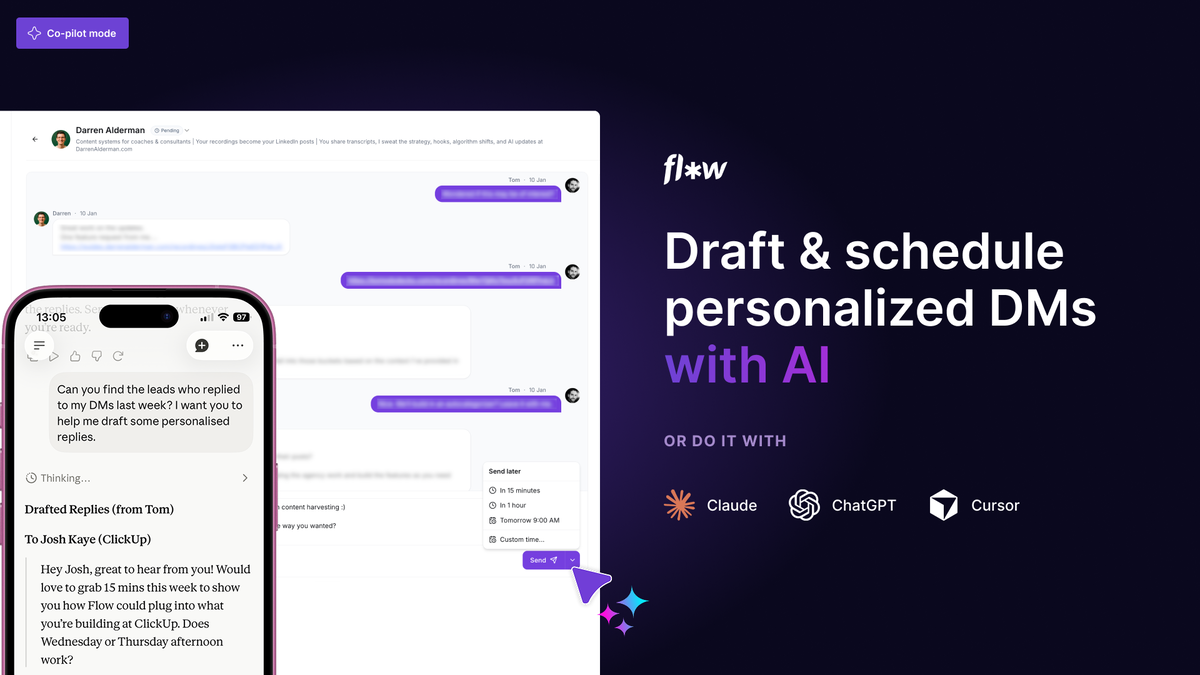
4. Co-pilot: AI-Assisted Replies With Context
The vendor says Co-pilot can use profile information, conversation history and activity context when helping draft replies. Users can also create prompt libraries and schedule messages. The practical attraction is speed: instead of re-reading every thread from scratch, the system can help prepare a response while the user remains responsible for accuracy and tone.
AI-generated messages still deserve review. Prospect facts can be misinterpreted, tone can become too polished or generic, and an AI can make assumptions you would never make manually. The safest workflow is to treat AI as a drafting and analysis layer rather than permission to stop paying attention.
5. The Standout Angle: ChatGPT & Claude Through MCP
Flow AI's MCP integration is one of the features that makes the offer different from a conventional LinkedIn sequencer. Flow's current documentation says supported assistants can be connected so users can ask in plain language to search leads, manage lists and work with messages. Its documentation currently includes setup guidance for ChatGPT and Claude.
This opens the door to workflows such as asking an assistant to define a segment, find relevant leads, inspect unread replies, draft responses, or coordinate Flow with other tools. However, users should distinguish between a prompt idea and an action that the current connector actually supports. Permissions, available actions and setup can evolve, so Flow's live documentation should be the authority.
Flow AI AppSumo Pricing — Checked October 1, 2026
At the time I checked the live AppSumo listing, Flow AI was being sold as a lifetime deal with three tiers. Because AppSumo deals can change, treat this table as a dated snapshot rather than a permanent price promise.
| Tier | Price shown | LinkedIn accounts | Core features shown |
|---|---|---|---|
| Tier 1 | $69 | 1 | Lead Finder, Auto-pilot, Co-pilot, scheduled messages, CRM, unified inbox, analytics, integrations/MCP |
| Tier 2 | $149 | 3 | Core features plus multi-account capabilities shown in the listing |
| Tier 3 | $279 | 10 | Designed for a larger number of connected accounts |
The listing also currently states lifetime access and a 60-day money-back guarantee. Confirm all current terms on AppSumo before purchasing.
VIEW LIVE PRICING & TERMS →Important Limitations and Things to Verify
LinkedIn limits still matter
Flow AI can provide guardrails, but LinkedIn controls its platform. A recent founder answer on AppSumo described changing lead-search limits for basic, Premium and Sales Navigator accounts. Verify current limits before making a purchase primarily for Lead Finder volume.
Automation does not fix the offer
You still need a relevant market, a credible offer and messages people want to answer. Flow AI can improve execution efficiency; it cannot manufacture product-market fit.
AI output requires review
Personalization is valuable only when it is true. Review generated messages and do not allow AI to invent familiarity, research, testimonials or prospect facts.
MCP adds power and complexity
Agentic workflows can save time, but they also require attention to permissions, credentials and what actions an assistant is allowed to take.
What Current AppSumo Buyers Are Saying
The current AppSumo listing shows a very high average rating, with reviewers frequently mentioning lead finding, campaign setup, unified inbox organization, support responsiveness and the Claude/MCP integration. Some reviewers also note that results still depend on good targeting and messaging, and that the product is evolving. I would treat those reviews as individual customer experiences, not guarantees of what another buyer will achieve.
My Exclusive Flow AI Bonus Package — 5 Bonuses, $935 Combined Suggested Value
If you purchase Flow AI through my affiliate link, my bonus package is designed to address the implementation work surrounding the software: deciding who to target, what to say, how to use AI thoughtfully, how to handle replies and how to run the first month as a measurable campaign.
Flow AI ICP & Lead Targeting Builder
Define a practical ideal-customer profile, qualification rules, exclusions and prospect-search criteria before you launch outreach.
LinkedIn Outreach Message & Sequence Builder
Build connection requests, opening messages, value follow-ups and low-pressure CTAs around a coherent campaign sequence.
ChatGPT & Claude MCP Command Vault
Structured prompt frameworks for targeting, segmentation, messaging, reply analysis and campaign improvement.
LinkedIn Reply-to-Meeting Conversion Kit
Frameworks for handling common replies, qualifying fit and moving appropriate conversations toward a meeting.
30-Day Flow AI Pipeline Launch System
A four-week implementation roadmap connecting targeting, messaging, AI assistance, replies and campaign measurement.
Get Flow AI + My 5-Bonus Pipeline Accelerator
Combined suggested bonus value: $935. These are original ePlanetJReviews educational resources and the values shown are suggested marketing values, not independent appraisals.
PURCHASE FLOW AI → THEN CLAIM YOUR BONUSESAfter purchase, email your AppSumo purchase proof to support@eplanetj.com with the subject “Flow AI Bonus Claim.”
How to Claim Your 5 Exclusive Flow AI Bonuses
Because there is no direct bonus-delivery connection available to us through AppSumo/Impact for this promotion, bonus access is handled manually by ePlanetJReviews after purchase verification.
Purchase Flow AI through an ePlanetJReviews affiliate button on this review page.
Save your AppSumo purchase confirmation or receipt.
Email support@eplanetj.com with the subject line Flow AI Bonus Claim.
Attach or include your purchase proof so the qualifying purchase can be verified.
Once verified, we’ll send you the instructions to access the 5-bonus Flow AI LinkedIn Pipeline Accelerator.
Bonus Claim Email: support@eplanetj.com
Privacy note: Do not send passwords, full payment-card details, banking credentials, or other sensitive financial information. A purchase receipt/order confirmation showing the qualifying Flow AI purchase is sufficient.
Want Faster Communication? Join Our WhatsApp Group
After emailing your Flow AI purchase proof to support@eplanetj.com, we also recommend joining the ePlanetJReviews WhatsApp Group for faster communication, bonus updates, access notices, and support announcements.
Important: Please send your purchase proof by email. Do not post receipts, order details, payment information, passwords, or other private information inside the WhatsApp group.
JOIN THE EPLANETJ WHATSAPP GROUP →Who Should Consider Flow AI?
Flow AI makes the most sense for: agencies prospecting for clients, recruiters sourcing candidates or business contacts, sales teams building B2B pipeline, consultants using LinkedIn consistently, and operators who want to connect LinkedIn activity to AI-assisted workflows.
It may be a poor fit for: someone who almost never uses LinkedIn for business development, someone expecting software to create demand for an unproven offer, or someone unwilling to review AI-generated communication and monitor platform rules.
Flow AI vs. Building the Stack Yourself
The strategic question is not simply whether Flow AI has a Lead Finder or inbox. You can assemble prospecting, automation, CRM and AI writing from separate tools. Flow AI's proposition is consolidation: one LinkedIn-centered environment plus MCP connectivity. Consolidation can reduce tab switching and handoffs, while a modular stack may offer deeper specialization. Which matters more depends on your workflow.
My Review Conclusion
Flow AI is an ambitious LinkedIn outreach platform because it combines the conventional parts of prospecting—lead discovery, sequences, inbox and CRM—with a newer agentic layer through MCP. The most interesting buyer is not someone looking for a magic “book meetings” button. It is someone who already sees LinkedIn as a meaningful acquisition channel and wants a more integrated way to operate it.
The AppSumo lifetime pricing makes the offer especially worth examining while it is available, but buyers should verify live deal terms and evolving LinkedIn search limits. The software can make outreach more organized and automated; targeting quality, message relevance, offer strength and human judgment remain essential.
Flow AI FAQ
What is Flow AI?
Flow AI is a LinkedIn prospecting and outreach platform that combines lead finding, automated outreach, a unified inbox, CRM-style pipeline management, AI-assisted replies and integrations including its LinkedIn MCP.
Does Flow AI include a lead database?
The AppSumo listing advertises access to a database of 300M+ LinkedIn profiles and says users can filter by criteria such as role, industry, company size and location.
Do I need LinkedIn Sales Navigator?
According to Flow AI's AppSumo FAQ, Sales Navigator is not required. The vendor says connecting Sales Navigator can unlock advanced search capabilities.
Can Flow AI connect with ChatGPT or Claude?
Yes. Flow AI documents an MCP connection that can be used with ChatGPT, Claude and other supported AI clients. Exact setup and supported actions should always be checked against the current Flow AI documentation.
Can I import my own leads?
The vendor says users can upload a CSV of LinkedIn profile URLs, and its MCP can also be used in workflows that bring leads from other systems.
Does Flow AI send replies automatically?
Flow AI offers Co-pilot, scheduling and AI/MCP workflows. How much automation you choose should depend on your configuration. Review messages and permissions carefully before enabling automated actions.
What is the unified inbox?
It centralizes conversations from connected LinkedIn accounts so teams can track replies, ownership and next steps in one place.
What does Co-pilot do?
The vendor describes Co-pilot as an AI-assisted reply feature that can use profile and conversation context and lets users build their own prompt library.
How many LinkedIn accounts are included?
At the time checked, AppSumo listed Tier 1 with 1 account, Tier 2 with 3 accounts and Tier 3 with 10 accounts.
What are the current AppSumo prices?
At the time checked on October 1, 2026, AppSumo displayed $69 for Tier 1, $149 for Tier 2 and $279 for Tier 3. Deal pricing can change, so confirm the live checkout page.
Is there a refund period?
The AppSumo listing currently states a 60-day money-back guarantee, subject to AppSumo's current terms.
Are there lead-search limits?
This is an area to verify before purchase. A recent founder answer said LinkedIn had imposed a 250-lead-per-month limit for basic LinkedIn accounts, while Premium and Sales Navigator accounts had higher stated search levels. The founder also said Flow was preparing a change. Because this is evolving, check the latest Flow AI/AppSumo information.
Will Flow AI guarantee meetings or sales?
No. Software can automate and organize outreach, but results still depend on targeting, offer quality, messaging, market conditions, account health and execution.
Who is Flow AI best suited for?
The AppSumo listing identifies marketing agencies, recruiters and sales managers. It can also be relevant to consultants and B2B operators who consistently use LinkedIn for prospecting.
How do I claim the ePlanetJReviews bonuses?
Purchase Flow AI through the ePlanetJReviews link on this page, save your AppSumo purchase confirmation or receipt, then email support@eplanetj.com with the subject line “Flow AI Bonus Claim” and include your purchase proof. Once the qualifying purchase is verified, we’ll send the instructions to access your exclusive ePlanetJReviews bonus package. Do not send passwords, payment-card details, or other sensitive financial information.
Ready to Inspect Flow AI?
Check the current AppSumo page for live pricing, terms and product updates. Purchasing through my link may earn ePlanetJReviews a commission at no additional cost to you and is the route used for my exclusive bonus package.
VISIT FLOW AI ON APPSUMO →After purchase: Email your purchase proof to support@eplanetj.com with subject Flow AI Bonus Claim.
For faster communication after emailing your proof: Join the ePlanetJReviews WhatsApp Group →
Sources & Verification Notes
This review was prepared from the Flow AI AppSumo sales-page material supplied to ePlanetJReviews and checked against the live AppSumo Flow AI listing and Flow AI's current public documentation on October 1, 2026. Product features, pricing, limits and deal terms can change. Always verify the current sales page and official documentation before purchasing or configuring automation.