
ViralDashboard Review 2026: Is the $147 All Access Bundle Worth It?

ViralDashboard Review 2026: Is the $147 All Access Bundle Actually Worth It?
ViralDashboard is being sold as a way to bring planning, AI-assisted creation, design, scheduling, engagement and reporting into one social-media workspace. That sounds convenient. The more useful question is whether it removes enough work from your current setup to justify buying it.
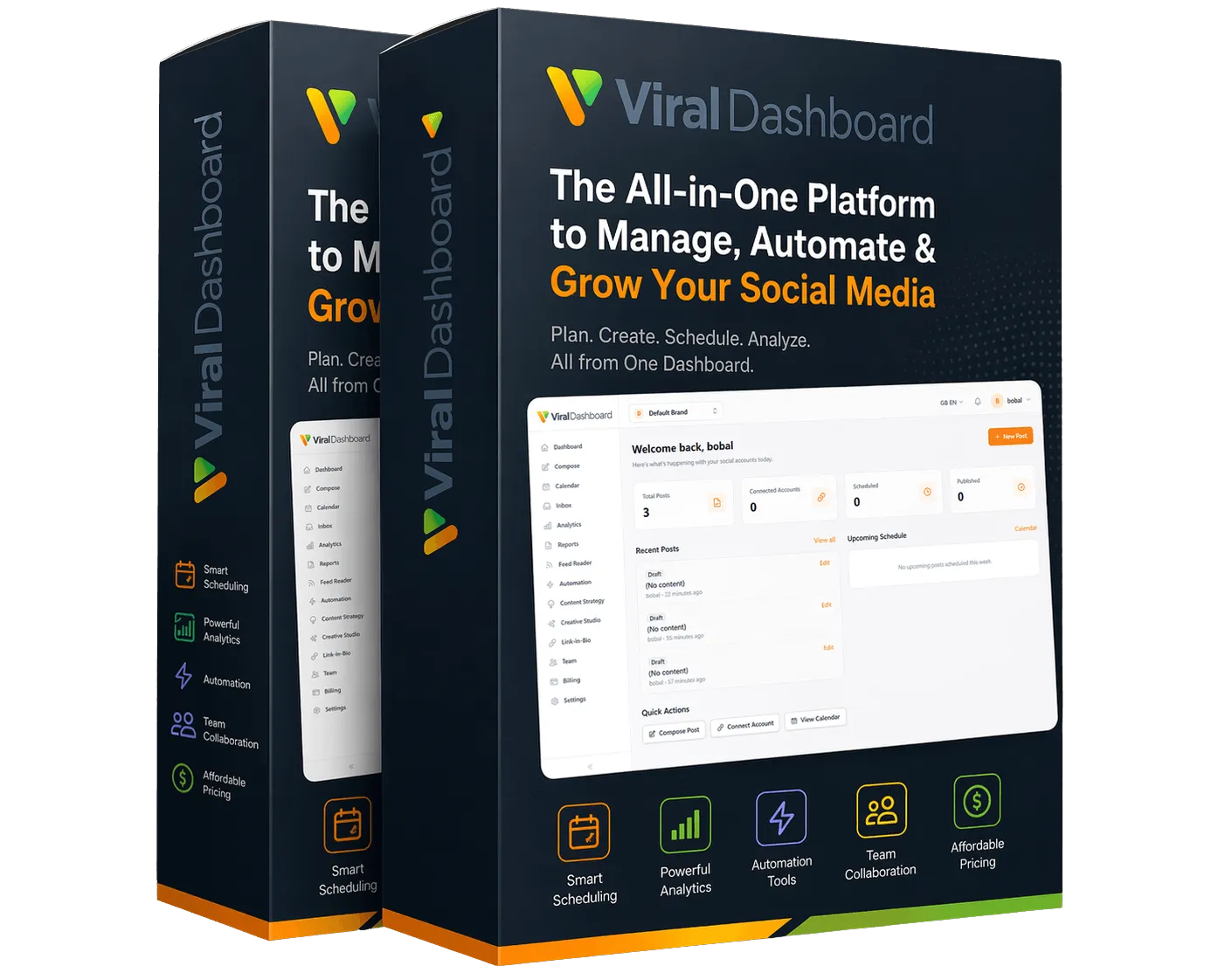
Watch the ViralDashboard VSL First
Before getting into my independent breakdown, watch the official ViralDashboard presentation below. It gives you the vendor’s own explanation of the offer first; then the review underneath separates the workflow, pricing, limitations and optional upgrades so you can make your own decision.
ViralDashboard Review: What the $147 All Access Bundle Actually Gives You
ViralDashboard is easy to misunderstand if you judge it by the size of its feature list. The useful question is not whether it can write captions, make graphics or schedule posts. Plenty of tools do one of those jobs. The real question is whether putting planning, creation, publishing, engagement, automation and reporting in the same workspace would remove enough friction from your
That is the question I have used throughout this review. I am not treating every vendor feature as automatically valuable, and I am not assuming that a one-time price makes software a good purchase. I have separated what is included in the launch bundle from the optional upgrades, called out the places where network APIs can limit what a social-media tool can do, and explained who can probably stop at the $147 bundle without buying more.
What Is ViralDashboard, in Plain English?
Think about what happens before and after a social post goes live. Someone has to decide what to publish, write the copy, find or create the visual, adapt the post for the destination, put it on a calendar, publish it, watch the replies and eventually work out what performed well. In many businesses, those steps live in separate tools.
ViralDashboard is an attempt to put most of that chain in one browser-based system. Its supplied material describes publishing to 20 destinations, an AI-assisted composer, a visual calendar, Creative Studio, a unified inbox, automation, RSS workflows, analytics, competitor/listening tools, link-in-bio pages and multi-brand/team features.
The distinction matters because I would not buy it simply for AI captions. I would not buy it merely because it has a scheduler either. Its case becomes stronger when you are already doing several of these jobs and the hand-offs between tools are costing time.
The 20 listed destinations are Facebook, Instagram, X/Twitter, LinkedIn, TikTok, YouTube, Pinterest, Threads, Bluesky, Mastodon, Reddit, Telegram, Tumblr, VK, Medium, Vimeo, WordPress, Shopify, WooCommerce and Google Business. That breadth is useful, but do not read “20 platforms” as “every feature behaves identically on 20 platforms.” Social networks expose different capabilities through their APIs, so publishing, messaging and moderation support can vary by destination.
See the Dashboard Before You Judge the Feature List
Feature tables can make almost any software look comprehensive. The product demo is more useful because it lets you see how the pieces are arranged and whether the workflow feels like something you would actually use.
The Real Product Is the Workflow, Not Any Single Feature
ViralDashboard makes more sense when you follow a piece of content through the system. You can start with a plan, move into the composer, create or attach the visual, schedule the post, deal with responses and then inspect the results. None of those steps is revolutionary on its own. Keeping the context together is the point.
Planning: start with a calendar, not a blank composer
The supplied offer includes AI-assisted 30-day planning and a done-for-you industry content library. This addresses a surprisingly ordinary problem: many people own scheduling software but still open it with no idea what to schedule. A monthly plan changes the starting question from “What should I post today?” to “What are we trying to talk about this month?”
I would still treat generated plans as drafts. AI cannot know which customer story you have permission to tell, which claim your business can substantiate, or which opinion sounds genuinely like you. Use it to remove the empty-calendar problem, not to remove editorial judgment.
Creation: useful when the copy and visual stay connected
The composer can assist with captions and images, while Creative Studio handles layers, text, duplication and design work before sending the asset back to the composer. The advantage is not simply that “AI can write.” It is fewer exports, downloads and re-uploads between the writing, design and scheduling stages.
There is still a quality trade-off. Generated content can become generic quickly. A business with a distinctive voice should establish its own examples, vocabulary, offers and boundaries rather than accepting first-draft AI copy because it is convenient.
Publishing: one source, several destinations
The calendar, scheduling tools and cross-platform composer are designed for people who publish repeatedly. The bundle also describes best-time scheduling, while higher-capacity options add features such as bulk CSV scheduling. This is where the “20 destinations” claim has practical value: a business working across mainstream networks plus places such as Google Business, Medium or WordPress may be able to reduce the number of publishing interfaces it visits.
But format still matters. A LinkedIn post is not automatically a good X post, and a Pinterest asset is not automatically a good Instagram asset. Centralized publishing saves mechanical work; it does not remove the need to adapt content to the audience and format.
Engagement: bring responses back into the operating loop
The unified inbox is intended to pull supported comments and direct messages into one place. The supplied feature material also references attachments, saved replies/searches, Meta Private Reply and moderation rules with testing, audit and kill-switch controls. For a brand receiving regular engagement, this can matter more than another content generator because missed replies are an operational problem, not a creative one.
Network capability varies. Before buying primarily for inbox management, check that the specific message or comment workflow you care about is supported on the network you use most.
Measurement: move from “we posted” to “what happened?”
Analytics include a cross-platform view, deeper platform reporting, post-level drill-downs, demographics, best-time information and CSV export. The intelligence layer adds competitor tracking and social listening, while reporting tools can produce PDFs. These are useful only if they change a decision. A dashboard full of charts that nobody acts on is still wasted time.
A better habit is to use the reports to answer specific questions: Which topics deserve another post? Which network is consuming effort without returning useful engagement? Which format should we repeat? What should we stop doing next month?
Feature-by-Feature: Where the Useful Parts Are
AI content and the 30-day planner
Best use: getting from no plan to an editable first draft. The supplied materials describe 30-day calendars containing captions, hashtags, visual briefs and suggested posting times, with industry libraries included at different offer levels. That can be genuinely useful for a small business that otherwise improvises every post.
Watch for: volume is not strategy. Thirty generated posts are not automatically thirty worthwhile posts. The value comes from editing the plan around actual campaigns, customer questions, evidence and brand voice.
Creative Studio and stock assets
Best use: routine social graphics that need to stay attached to the publishing workflow. Layers, text, autosave, duplication, stock search and “Send to Composer” reduce tool switching.
Watch for: this should not be confused with a specialist creative suite. If advanced image manipulation or video production is central to your work, dedicated creative software will still have a place.
Evergreen recycling and IF-THEN automation
Best use: repeatable content that remains relevant—guides, evergreen offers, recurring reminders or proven posts. Rules, logs and kill-switch controls matter because automation without visibility can create mistakes at scale.
Watch for: recycling weak content simply republishes weak content. Automate material because it has earned another run, not because the feature exists.
RSS reader and AI summaries
Best use: monitoring selected sources and turning a reading routine into a more organized research workflow. Feed discovery, OPML and folders are especially relevant if RSS is already part of how you track a niche.
Watch for: a summary is not permission to copy somebody else's work, and it is not a substitute for reading the source when accuracy matters.
Competitor intelligence and social listening
Best use: spotting themes, reactions and competitor activity without manually checking accounts every day. This can help identify questions worth answering or content gaps worth testing.
Watch for: sentiment and automated interpretation should be treated as signals, not ground truth. Context, sarcasm and small samples can distort what a dashboard appears to say.
Link-in-bio pages and email capture
Best use: connecting social attention to destinations you control. Scheduled blocks, analytics, QR codes and email capture make this more than a decorative profile link.
Watch for: ViralDashboard is not an email autoresponder. Capturing an address and running a complete email lifecycle are different jobs.
Teams, brands and approvals
Best use: businesses where more than one person touches content. Brand workspaces separate assets and identities; team seats and approvals reduce the chance of the wrong post being published from the wrong account.
Watch for: the launch All Access limits matter. The supplied plan information describes 5 brand workspaces, 25 social accounts and 3 team seats at the PRO level. If you already know you will exceed those limits, evaluate Scale Pack or MAX before assuming the entry bundle is enough.
What ViralDashboard Does Not Replace
ViralDashboard covers a broad section of social-media operations, but breadth can create the impression that it replaces everything around marketing. It does not.
It is not a video editor
You can manage and publish social content, but serious timeline editing, effects and production work still call for a dedicated video tool.
It is not a traffic source
Scheduling more efficiently does not make people see or respond to a post. Distribution, creative quality, audience fit and consistency still matter.
It is not an email autoresponder
Lead capture can feed a marketing process, but ongoing sequences, deliverability and subscriber management belong in an email platform.
It does not make strategy automatic
AI can suggest ideas and analyze data. Someone still has to decide what the business stands for, what it can prove and which audience is worth serving.
Who Is ViralDashboard Best For—and Who Should Skip It?
It makes more sense if…
You publish frequently across several networks; manage more than one brand; regularly move copy and graphics between separate tools; need an approval process; want engagement and reporting closer to publishing; or are building a small social-media service for clients.
I would hesitate if…
You post once or twice a month; use only one network; already have a mature workflow your team likes; mainly need advanced video creation; expect software to generate traffic by itself; or are buying because the feature count sounds impressive rather than because you can name a workflow it will replace.
A simple test: write down the tools and manual steps you use to take one campaign from idea to report. If ViralDashboard removes several recurring hand-offs, the value proposition is concrete. If it only replaces one small task, the case is much weaker.
ViralDashboard Price: What Is Actually Inside the $147 All Access Bundle?
For the October 2026 launch, the supplied partner material prices the All Access Bundle at $147 one-time. Importantly, this is not described as a stripped-down front end. It combines ViralDashboard Commercial with the PRO-level versions of five upgrades. The same supplied material lists those components at $339 when purchased separately in the standard funnel.
| Included | What it adds | Supplied separate price |
|---|---|---|
| ViralDashboard Commercial | Core 20-destination publishing workflow, composer, calendar, Creative Studio, inbox, automation, link-in-bio, feed reader and commercial licence | $37 |
| Growth PRO | 500 posts/month, 25 social accounts, 5 brands, 3 team seats, approvals and 10 GB storage | $47 |
| AI Vault Starter | AI credit vault plus starter DFY industry library | $47 |
| Analytics Advanced | Cross-platform/per-platform analytics, post drill-downs, demographics, best times, CSV and 90-day history | $47 |
| Intelligence Insight | 5 listening queries, 3 tracked competitors and 5 PDF reports/month | $47 |
| Traffic Grow | 10 additional bio pages, email capture, click analytics and QR codes | $37 |
| Credit boost | Additional one-time AI-credit top-up in the supplied launch stack | $77 |
| Supplied separate total | $339 |
What Happens After You Buy? The Upgrade Funnel Without the Sales Pitch
This is the section I would want before clicking a checkout button. The question is not “Are there upsells?” There are. The useful question is whether the $147 purchase stands on its own and what problem each later offer is meant to solve.
Scale Pack — $47
The order bump adds 5 brand workspaces and 15 social accounts to the buyer's current limits. On top of All Access, that takes the supplied limits from 5 brands/25 accounts to 10 brands/40 accounts. If you can already see yourself exceeding the base limits, it has a clear job. If not, more capacity has no immediate value.
Megabundle MAX — $247
MAX moves the five upgrade areas from PRO to their higher-capacity tiers and is aimed at heavier users and service providers. Supplied materials describe unlimited posts, higher account/brand capacity, a larger industry library, deeper analytics history and AI insights, more listening/competitor capacity, more reporting and more bio pages. It also includes an Agency Launch Kit and a fast-action credit component in the supplied funnel.
My decision rule: do not buy MAX because “MAX” sounds safer. Buy it when you can point to a PRO limit that your actual workload is likely to hit.
MAX Lite — $147 downsell
The supplied funnel describes MAX Lite as the MAX-tier upgrades without the Agency Launch Kit and without the fast-action credit bonus. If you want the higher limits but do not value those two extras, Lite is the cleaner comparison.
DFY Setup — $197
This solves a different constraint: time. The supplied offer says the team sets up the buyer's account after receiving business and brand information, including brand-kit work, platform integration, a 30-day content calendar, captions/hooks, post templates, strategy/branding materials and agency-oriented sales assets. It is a convenience service, not a requirement for the software to function.
Agency Silver — $97 / Agency Gold — $197
Do not confuse Agency with permission to use ViralDashboard commercially. The supplied All Access bundle already includes a commercial licence. Agency is about the client operating structure: the material describes 10 client workspaces on Silver and 25 on Gold, client portal logins, per-client feature controls, payment links, client management, API access and webhooks.
So the question is not “Will I ever work with a client?” It is “Do I need a larger client-facing workspace and agency-management layer?” A freelancer with a couple of brands may be comfortable with All Access or All Access plus Scale Pack.
The Vendor's Launch Bonuses
These are delivered by the ViralDashboard team. I am keeping them separate from the ePlanetJReviews package below so there is no confusion about who provides what.
90-Day Content Calendar Pack
Vendor-stated value: $197. Intended to reduce the planning burden after the initial month.
Client Acquisition Playbook
Vendor-stated value: $297. More relevant to freelancers and agencies than to a business managing only its own accounts.
Viral Content Swipe File
Vendor-stated value: $147. A reference resource for content ideas and patterns; examples should still be adapted to the brand.
Fast-Start Onboarding Course
Vendor-stated value: $97. Designed to shorten the learning and setup phase.
Pros and Trade-Offs After Looking at the Whole Offer
What stands out positively
The launch bundle is broad for the entry purchase; the commercial licence is already included; the workflow connects creation with publishing, engagement and measurement; 20 listed destinations give it wider coverage than a basic scheduler; and the PRO limits are substantial enough that many solo marketers and small businesses may not need MAX immediately.
What deserves caution
Twenty integrations do not mean identical capabilities on every network; AI output still needs editing; advanced creative/video work remains outside the product; heavy agencies need to study limits carefully; the supplied promotional materials conflict on exact AI-credit quantities; and a broad dashboard can be overkill for somebody with a simple social routine.
Refund, Support and the Checks I Would Make Before Buying
The current offer material used for this review advertises a 14-day money-back guarantee. Vendor product support is listed at support@viraldashboard.io. ePlanetJReviews bonus support is separate and is handled through support@eplanetjreviews.com.
Before purchasing, verify the live checkout price, the exact AI-credit quantity, the guarantee wording and any network-specific capability that is essential to your workflow. Social APIs change, and a buyer who needs one very specific inbox or publishing action should confirm that action rather than relying on the broad “20 platforms” headline.
ViralDashboard Review Verdict: Is the $147 Bundle Worth It?
For the right buyer, the value is in consolidation. If you are currently planning in one place, writing in another, designing elsewhere, scheduling in another tool and then checking analytics separately, ViralDashboard has a coherent reason to exist in your workflow. The $147 launch bundle matters because it includes the PRO-level upgrade stack rather than forcing a buyer to assemble those pieces immediately after purchase.
I would not recommend it simply because it has AI or because 20 platforms sounds impressive. If your social-media operation is small and uncomplicated, you may be buying capacity you do not need. If you already have a team workflow that works well, migration itself has a cost.
For creators, marketers, small businesses and smaller client operations that can identify several tools or manual hand-offs they want to remove, the All Access bundle is the version I would evaluate first. Start there. Add Scale Pack, MAX or Agency only when your real workload gives you a reason.
If ViralDashboard Fits, Here Is What I Add to Help You Use It Better
I deliberately left my bonuses until after the review. A bonus package should not turn unsuitable software into a suitable purchase. It should make a suitable purchase easier to implement.
ViralDashboard supplies the machinery. These resources focus on decisions the software cannot make for you: positioning a brand voice, choosing angles, adapting content, organizing evergreen material, handling engagement, onboarding clients, pricing services, checking content quality, interpreting analytics and tracking campaigns.
1. 30-Day Social Authority Campaign Planner
Value: $97. Turns a month into a coherent campaign instead of 30 unrelated posts.
2. Brand Voice DNA Builder
Value: $127. Defines tone, vocabulary, boundaries and examples so AI-assisted content sounds more like the brand.
3. Content Hook & Angle Laboratory
Value: $127. Frameworks for finding multiple useful ways into the same topic without recycling the same opening.
4. Multi-Platform Content Adaptation Playbook
Value: $147. Turns one core idea into platform-appropriate versions rather than blindly cross-posting identical copy.
5. 90-Day Content Pillar & Evergreen Engine
Value: $147. Builds reusable content around durable themes and a longer planning horizon.
6. Social Engagement & Unified Inbox SOP
Value: $97. Response and triage procedures for making a unified inbox useful instead of creating another queue.
7. Social Listening & Competitor Intelligence Workbook
Value: $167. Turns monitoring data into questions, observations and actions instead of passive competitor watching.
8. Client Onboarding & Brand Workspace Kit
Value: $197. Structures the information needed before managing another brand.
9. Social Media Service Pricing & Proposal Builder
Value: $197. Helps service providers define scope, pricing logic and proposals around the work they will deliver.
10. Client Approval & Content QA Command Center
Value: $147. Quality and approval checks designed to catch avoidable publishing errors before content goes live.
11. Analytics-to-Action Reporting System
Value: $197. Turns performance numbers into concrete decisions for the next content cycle.
12. Lead Capture & Link-in-Bio Conversion Kit
Value: $167. Connects profile traffic, calls to action, lead capture and campaign tracking.
ViralDashboard Interactive Marketing Apps Suite
Stated value: $297. This is separate from the 12 PDF resources. It is a browser-based collection of practical mini-apps built around the same implementation problems.
The suite includes a 30-Day Campaign Builder, Brand Voice DNA Builder, Hook & Angle Generator, Multi-Platform Content Adapter, Evergreen Content Engine, Engagement Response Builder, Competitor Intelligence Analyzer, Client Onboarding Builder, Service Pricing Calculator, Content QA Checker, Analytics-to-Action Calculator and UTM Campaign Builder.
Total stated value of the complete 13-bonus ePlanetJReviews package: $2,111.
Launch-Period Extra Resource Pack
During the launch period, the package also includes five additional training resources supplied to ePlanetJReviews: The Traffic Handbook, Boost Your Website Traffic, Social Traffic Plan, 30 Days Content Marketing Plan and Traffic Secrets Unleashed.
These extras are intentionally not included in the $2,111 valuation. The supplied descriptions identify them as MRR resources; buyers should read the licence packaged with each resource before editing, reselling or redistributing anything. A promotional label is not a substitute for the actual licence terms.
How to Claim the ePlanetJReviews Bonuses
Purchase ViralDashboard through an affiliate button on this review, keep your purchase receipt, and email your proof of purchase privately to support@eplanetjreviews.com. Do not post receipts, transaction IDs, email addresses or other purchase details in a public group.
You can also join the ePlanetJReviews WhatsApp community for campaign updates, but use email—not the group—for private purchase verification.
ViralDashboard FAQ
What is ViralDashboard?
ViralDashboard is a browser-based social-media management platform designed to combine content planning, AI-assisted creation, design, scheduling, publishing, engagement, automation, analytics, listening and multi-brand workflows in one system.
How much is ViralDashboard during the October 2026 launch?
The supplied launch material prices the All Access Bundle at $147 one-time. Verify the live checkout before purchasing because launch pricing and availability can change.
Is the $147 All Access Bundle only the basic version?
No. The supplied offer describes it as ViralDashboard Commercial plus the PRO-level tier of five upgrades: Growth PRO, AI Vault Starter, Analytics Advanced, Intelligence Insight and Traffic Grow, along with the launch credit component.
Which social platforms does ViralDashboard support?
The supplied materials list Facebook, Instagram, X/Twitter, LinkedIn, TikTok, YouTube, Pinterest, Threads, Bluesky, Mastodon, Reddit, Telegram, Tumblr, VK, Medium, Vimeo, WordPress, Shopify, WooCommerce and Google Business. Capabilities can differ by network because platform APIs differ.
Does ViralDashboard replace Canva, ChatGPT or every social tool?
Not necessarily. It overlaps with writing, routine design, scheduling, inbox, analytics and other functions, but specialist creative tools may remain better for advanced work. The value depends on how much of your existing workflow it can realistically consolidate.
Does ViralDashboard include a commercial licence?
The supplied All Access offer says yes. That is separate from the optional Agency plans, which add client workspaces, client portal features and agency-oriented management capabilities.
Do I need Megabundle MAX?
Not automatically. All Access already includes the PRO-level stack. MAX is most relevant when you need the higher capacity, deeper analytics/intelligence limits, larger content library or other MAX-level allowances described in the offer.
What is the Scale Pack?
The $47 order bump adds 5 brand workspaces and 15 social accounts to the buyer's current limits. On the supplied All Access limits, that means 10 brands and 40 social accounts.
What is the difference between a commercial licence and the Agency upgrade?
The commercial licence concerns using the software for commercial/client work. The Agency plans add a larger client operating structure, including client workspaces, portal logins, controls, payment links and, according to the supplied material, API/webhook access.
Are ViralDashboard AI credits monthly?
The supplied material consistently describes the credit vault as one-time/non-expiring, but exact quantities are inconsistent across the promotional documents provided for this review. Check the live offer for the quantity attached to your purchase.
Is ViralDashboard a video editor?
No. It can be part of a social publishing workflow, but it should not be treated as a replacement for a dedicated advanced video editor.
Will ViralDashboard generate traffic or sales automatically?
No. Software can make content operations more efficient, but it cannot guarantee reach, engagement, leads, sales or income.
What refund period is advertised?
The current offer material used for this review advertises a 14-day money-back guarantee. Verify the live guarantee terms at purchase.
What do I receive if I buy through ePlanetJReviews?
After a qualifying purchase is verified, the package includes 12 implementation resources plus Bonus #13, the ViralDashboard Interactive Marketing Apps Suite. The combined stated value is $2,111, with separate launch-period resources also described on this page.
How do I claim the bonuses?
Purchase through an affiliate button on this review, save the receipt and email proof privately to support@eplanetjreviews.com. Do not post private transaction information in the WhatsApp community.
Review Method and Source Notes
This review was prepared from the ViralDashboard launch/partner materials, offer descriptions, vendor media and product information supplied for the October 2026 campaign. Vendor feature, price, limit, guarantee and value statements are treated as vendor-supplied claims unless explicitly described otherwise. Where supplied materials conflict—most notably around exact AI-credit quantities—the conflict is disclosed rather than silently resolved.
The editorial judgments on this page are based on how the described features fit common social-media workflows. They are not a claim that ePlanetJReviews independently benchmarked every integration or personally used every feature. Because third-party social platforms can change their APIs, buyers should verify any network-specific capability essential to their decision.

Keep reading
Battery Profits Review 2026 – Is It Worth $47?
Quick AnswerIndependent buyer guide • Updated October 19, 2026 Battery Profits Review 2026: What You’re Actually Getting for $47 — and Who…
Read the guide
BizinGPT Review 2026: Features, Pricing, Coupons & Bonuses
ePlanetJReviews.comIndependent review · October 2026WhatsApp community ↗BIZINGPT REVIEW 2026 · FEATURES, PRICING & BUYER BONUSESBizinGPT Review 2026:Would I Build a Client Service Around It?BizinGPT caught my…
Read the guide
AutoAffiliate360 Review 2026: Powerful Features, Hidden Costs & 8 Bonuses
Quick AnswerePlanetJReviews.comIndependent affiliate review · October 2026 AUTOAFFILIATE360 REVIEW & BUYER BONUSES Could you manage an affiliate campaign from WhatsApp? Finding an…
Read the guide