WP Sync Review (2026): Features, Pricing, 147 Integrations, Demo & Bonuses
WP Sync Review: Features, Pricing, 147 Integrations, Demo & Exclusive Bonuses
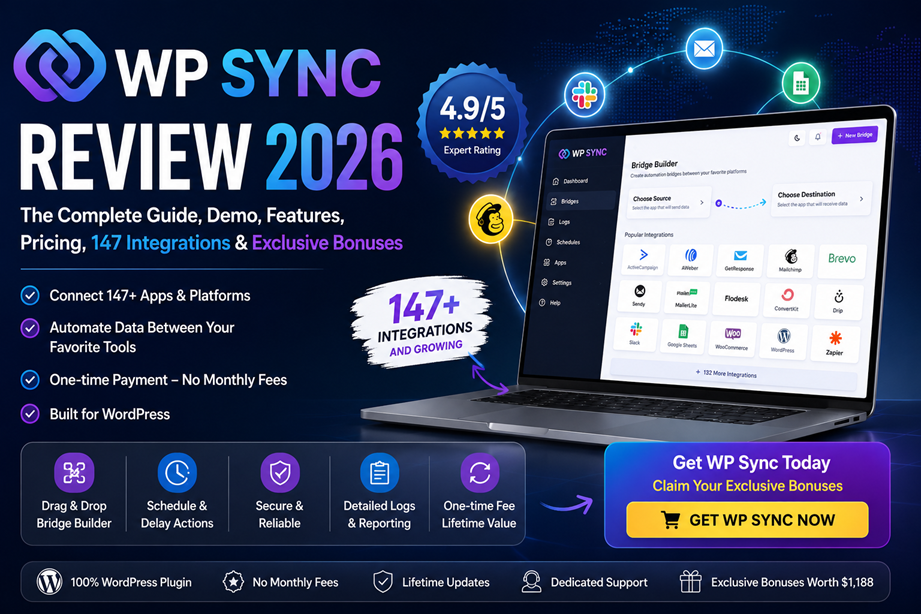
WP Sync is presented as a WordPress-based automation platform for moving contacts between supported marketing, commerce, course, form, CRM, webinar, and notification tools through configurable bridges.
WP Sync at a Glance
What is WP Sync?
Who is it designed for?
WP Sync is positioned for users whose leads, customers, students, members, bookings, or supporters enter through one platform but need to be available in another. The clearest audiences are affiliate marketers, course creators, ecommerce operators, agencies, coaches, consultants, membership-site owners, and local businesses that already rely on WordPress.
Demo and Interface Observations
The supplied demo material shows a WordPress-admin interface with a large grid of integrations and a presenter explaining that the project grew from a personal need into a broader automation product.
What the demo suggests
- The integration selector is organized visually rather than through code.
- The product is managed from inside WordPress.
- The presenter emphasizes speed and simplicity when creating bridges.
- The transcript excerpt references continued expansion of supported connections.
What still needs live verification
- Exact event names available in each connector.
- Field mapping depth for every third-party platform.
- Connector-specific limits or authentication requirements.
- Behavior under high-volume production use.
Feature Analysis
Bridge Builder
Defines where a contact comes from, where it goes, and which rules apply between those points.
Multiple Destinations
One source event can fan out to several destinations, such as an autoresponder, a spreadsheet, and a notification channel.
Scheduling and Delays
Destinations may run immediately, after a relative delay, or at a specific date and time.
Tags and Custom Fields
Contacts can arrive with tags and mapped fields that preserve product, source, plan, or lifecycle context.
Filters
Rules can be applied so only qualifying contacts move through a bridge.
Activity Logs
Searchable logs and bridge history help users review successes and failures.
Dry-Run Testing
A no-write simulation helps inspect what a destination would receive before live data changes.
Bridge Cloning
Existing bridge setups can be duplicated to speed up similar workflows.
WordPress-Based Control
The product is designed to run inside the user's WordPress site.
Supported Integration Categories
The supplied sales materials list 147 connections in the full package across autoresponders, commerce platforms, course systems, forms, CRMs, webinar tools, notifications, and more.
| Category | Examples | Typical use |
|---|---|---|
| Autoresponders | ActiveCampaign, AWeber, Brevo, ConvertKit, GetResponse, GoHighLevel, Mailchimp, MailerLite, Systeme.io | Subscriber movement, migration, tagging, and nurture entry |
| Payments and ecommerce | WooCommerce, Stripe, PayPal, Shopify, ClickBank, JVZoo, WarriorPlus, ThriveCart | Buyer onboarding, product tagging, reporting, and upsell entry |
| Courses and memberships | Kajabi, Teachable, Thinkific, LearnDash, MemberPress, Paid Memberships Pro | Student and member onboarding |
| Lead capture | Facebook Lead Ads, Instagram Lead Ads, Typeform, Jotform, Gravity Forms, WPForms | Immediate lead routing and nurture |
| Bookings and webinars | Calendly, Cal.com, Zoom, GoToWebinar | Registration, reminders, and follow-up |
| CRM and project tools | Airtable, Pipedrive, monday.com, Notion, Trello, ClickUp | Create records, cards, items, or deals |
Pricing and Upgrade Path
WP Sync Core
Bridges 35 autoresponders inside WordPress.
Best for: email-platform-to-email-platform automation.WP Sync Bundle
Includes all 147 listed connections.
Best for: buyers using forms, checkouts, courses, CRMs, notifications, and other non-email tools.WP Sync Reseller
Reseller-focused order bump.
Best for: marketers specifically seeking reseller rights.Developer License
25-site licensing for Core or the complete package.
Best for: agencies and multi-site operators.WP Conversion Tracker
Tracks clicks, leads, and sales by link.
Best for: users who also need campaign tracking.Tracker Extensions
Audience Vault, reseller rights, and developer options.
Best for: larger Tracker deployments.Exclusive Bonus Center
The bonus package is designed as an interactive implementation toolkit rather than a collection of static PDFs.
Automation Success Toolkit Pro
Flagship automation planning and optimization suite.
$997 valueWP Sync Quick Start Playbook
Interactive setup, bridge planning, testing, troubleshooting, and saved progress.
$97 valuePreview App147 Integration Recipe Finder
Generate source-to-destination recipes with fields, tags, timing, and tests.
$197 valuePreview AppBridge Template Library
Ready-to-build blueprints for common marketing and business workflows.
$197 valuePreview AppLaunch Automation Blueprint Planner
Create phased automation plans for launches, webinars, memberships, SaaS, and agencies.
$297 valuePreview AppFrequently Asked Questions
What is WP Sync?
WP Sync is a WordPress-based automation plugin designed to move contacts between supported apps through configurable bridges.
Does WP Sync require WordPress?
Yes. The supplied materials position it as a plugin that runs inside a WordPress site.
How many integrations does WP Sync support?
The complete package is presented with 147 listed connections. Core focuses on 35 autoresponders.
Can one contact go to multiple destinations?
The product materials describe multiple destinations per bridge.
Can WP Sync schedule or delay a contact?
Yes. The supplied materials describe immediate delivery, relative delays, and release at a specific date and time.
Are all upgrades required?
No. Core or the Bundle can be purchased as the main product, while the other offers serve narrower use cases.
Final Verdict
WP Sync appears strongest for WordPress users who repeatedly need to move contacts between marketing and business tools and want more control over those workflows.