

TalkingPhotos AI Review After Creating 200+ Videos: My Founder Member Experience
Table Of Contents
- Quick Answer
- My Personal Rating
- My Usage Snapshot
- Why This Review Is Different
- Why I Bought TalkingPhotos AI
- Why I Chose The Unlimited Plan
- One Lesson I’ve Learned After Buying Software For Years
- What Is TalkingPhotos AI?
- TalkingPhotos AI Then vs Now
- Real-World Use Cases: How I’ve Used It
- Why Multi-Scene Video Creation Became One Of My Most Used Workflows
- Complete Feature Breakdown
- What I Like Most
- What Could Be Better
- Comparison: Launch-Day Features vs Long-Term Product Development
- Comparison: Simpler Purchase Structure
- Pricing & Value Analysis
- Who Should Use TalkingPhotos AI?
- Frequently Asked Questions
- Final Verdict
- Affiliate Disclosure
- Review Methodology
Quick Answer
If you’re looking for a way to create talking videos, avatar presentations, personalized greetings, singing videos, social awareness content, or explainer videos without constantly recording yourself on camera, TalkingPhotos AI is one of the more practical AI video tools I’ve personally used.
I purchased TalkingPhotos AI as a Founder Member shortly after launch and currently own the Unlimited Plan.
Over nearly two years of use, I’ve created more than 200+ videos using the platform across promotional content, YouTube explainers, birthday greetings, anniversary messages, social awareness campaigns, talking avatar videos, and creative projects.
What keeps me using the software isn’t a single feature.
It’s the combination of:
- Talking Photos
- Multi-scene video creation
- Flexible content creation workflows
- Continued product updates
- One-time purchase model
- Practical everyday usability
Most importantly, the platform has continued evolving long after launch, which is something I personally value when buying software.
This review is based on long-term usage rather than a few hours of testing.
My Personal Rating
Category | Rating | Notes |
Ease Of Use | 8.5/10 | Easy to start creating videos without a steep learning curve |
Video Quality | 8/10 | Good results when using quality source images and scripts |
Talking Photos | 9/10 | Still my most-used feature |
Singing Videos | 7.5/10 | Fun, creative, and surprisingly engaging |
Creative Flexibility | 8/10 | Multiple content styles and use cases |
Personalized Greetings | 9/10 | Excellent for birthdays, anniversaries, and special messages |
Product Updates | 9/10 | Consistent improvements since launch |
Value For Money | 9/10 | Strong value considering the one-time payment model |
Long-Term Reliability | 9/10 | Still actively developed nearly two years later |
Overall Experience | 8.7/10 | Positive long-term experience |
Overall Assessment: 8.7/10
No software is perfect.
These ratings reflect my personal experience as a Founder Member and Unlimited Plan user after creating hundreds of videos across multiple projects and content types.
My Usage Snapshot
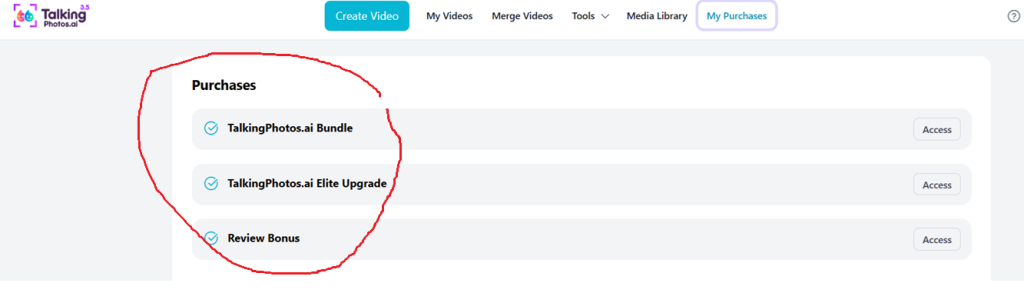
Founder Member: Yes
Plan Owned: Unlimited Plan
Usage Period: Nearly 2 Years
Videos Created: 200++
Most Used Features
- Talking Photos
- Multi-Scene Video Creation
- Upload Your Own Photos
- Video Merger
- Upload Your Own Voice
Primary Use Cases
- Promotional Videos
- YouTube Explainer Videos
- Birthday Greetings
- Anniversary Wishes
- Social Awareness Content
- Singing Videos
- Talking Avatar Content
Personally Had Bought This Launch Announcment Period
Why This Review Is Different
Most software reviews follow a predictable pattern.
The reviewer purchases the product, spends a few hours testing it, reads the sales page, and then publishes a review.
There is nothing inherently wrong with that approach.
The problem is that short-term testing can only tell you so much.
A few hours of use can demonstrate features.
It cannot demonstrate:
- Long-term reliability
- Product evolution
- Consistent development
- Real-world usefulness after launch
- Whether the software is still relevant months or years later
My experience with TalkingPhotos AI is different.
I purchased the software as a Founder Member shortly after launch and have continued using it for nearly two years.
During that time I have created more than 200+ videos across multiple content formats and use cases.
I’ve watched the software evolve from its earlier versions into a more capable platform with additional movement options, expanded creative possibilities, improved multi-scene workflows, and more flexibility than what originally attracted me to the product.
This review reflects that long-term experience rather than a short evaluation period.
Why I Bought TalkingPhotos AI
When I first discovered TalkingPhotos AI, I wasn’t looking to replace professional video editing software.
I wasn’t trying to build complex animated productions.
I simply wanted a faster way to create engaging videos without constantly recording myself on camera.
At the time, I was already creating various forms of content, including:
- Promotional videos
- Educational content
- Social media posts
- Product explanations
- Online presentations
Like many content creators, I found that recording videos consistently required more time than expected.
There was:
- Recording
- Retakes
- Editing
- Voiceovers
- Exporting
- Resizing for different platforms
The idea of transforming a photo into a talking video immediately caught my attention because it addressed a problem I encountered repeatedly.
Instead of recording every video manually, I could:
- Choose a character or photo
- Add a script
- Generate speech
- Create the video
Much faster than starting from scratch.
That was the original reason I purchased TalkingPhotos AI.
Looking back, I ended up using it for far more than I originally anticipated.
This format should paste cleanly into Word, Google Docs, or your CMS.
Why I Chose The Unlimited Plan
When I purchased TalkingPhotos AI, I chose the Unlimited Plan.
The decision wasn’t based on a specific feature.
It was based on how I intended to use the software.
I wasn’t planning to create a few videos, test the platform, and move on.
I wanted the freedom to experiment.
I wanted to test different content formats.
I wanted to create videos whenever I needed them without constantly worrying about limitations.
At the time, I didn’t know exactly how much I would end up using the software.
What I did know was that I enjoyed creating content and wanted the flexibility to explore different ideas.
Looking back, that decision turned out to be the right one for my situation.
What started as occasional testing gradually became part of my regular workflow.
Nearly two years later, I’ve created more than 200+ videos using the platform.
Those videos have included:
- Promotional videos
- Talking avatar content
- YouTube explainers
- Birthday greetings
- Anniversary wishes
- Social awareness campaigns
- Singing videos
- Personal projects
- Experimental content
For me, the Unlimited Plan made sense because I intended to use the software regularly.
That doesn’t mean every user needs the same plan.
Someone creating occasional videos may find another option perfectly sufficient.
However, because I wanted long-term flexibility and room to experiment, the Unlimited Plan aligned well with my goals.
One Lesson I’ve Learned After Buying Software For Years
Over the years, I’ve purchased a lot of software.
Some products were excellent.
Some were useful for a while.
Others disappeared completely.
One thing I’ve learned is that launching a software product and maintaining a software product are two very different challenges.
Launching is exciting.
The sales page looks great.
The feature list sounds impressive.
The demonstrations are polished.
Early users are enthusiastic.
But the real test starts after launch.
Questions I now ask myself include:
- Will this software still be updated six months from now?
- Will the developer continue improving it?
- Will users still be actively using it?
- Will the software remain relevant in a year or two?
Those questions have become more important to me than the original feature list.
I’ve purchased products in the past that looked promising on launch day but gradually became less active over time.
Updates slowed down.
New features stopped appearing.
Development became difficult to see.
Support became less visible.
As a customer, that experience taught me to pay attention to long-term development rather than launch-day excitement.
This is one area where TalkingPhotos AI has stood out in my experience.
Since purchasing it as a Founder Member, I’ve continued seeing updates, improvements, new movement styles, workflow enhancements, and additional creative options being introduced.
One example that directly affected my own workflow was the ability to create videos scene by scene and combine those scenes into larger projects.
When I first started using the software, most of my projects consisted of individual clips.
Today, I can create multiple scenes with different styles, movements, gestures, backgrounds, and dialogue, then combine them into a longer and more structured video.
That evolution has increased the practical value of the platform far more than any individual feature announcement could.
For me, one of the strongest reasons I continue using TalkingPhotos AI isn’t what it could do on launch day.
It’s the fact that the platform has continued improving since then.
A Simpler Purchase Experience Than Many Software Launches
Another aspect I appreciated was the relatively straightforward purchase experience.
Over the years, I’ve purchased many different software products.
One frustration I’ve occasionally encountered is trying to determine exactly what is included versus what requires additional upgrades.
Sometimes important functionality is spread across multiple offers.
Sometimes the final cost of using the software isn’t immediately obvious.
Sometimes users need to navigate a long sequence of upgrade pages before fully understanding what they’re purchasing.
My experience with TalkingPhotos AI felt different.
The offer structure was easier to understand.
I could see what was included and make a purchasing decision based on how I intended to use the software.
Because I chose the Unlimited Plan, I personally didn’t feel like I needed to navigate a lengthy sequence of upgrades just to access the features I wanted most.
Combined with the one-time payment model, that simplicity was something I viewed as a positive.
As a customer, I appreciate clarity.
I want to understand what I’m buying and how I can use it.
That straightforward approach was one of the reasons I felt comfortable making the purchase.
What Is TalkingPhotos AI?
At its core, TalkingPhotos AI is a platform designed to transform static images into animated videos.
Users can create a wide variety of content formats including:
- Talking videos
- Singing videos
- Dancing videos
- Human avatar videos
- Animal talking videos
- Object talking videos
- Cartoon character videos
- Fantasy character videos
The platform allows users to upload their own images or generate characters using AI.
Once a character is created, it can be animated using text, audio, or voice input.
The result is a video where the character appears to speak, sing, move, and interact with the viewer.
Unlike traditional video production workflows that require cameras, lighting, recording sessions, and extensive editing, many projects can be created using nothing more than a photo and a script.
Additional capabilities currently include:
- Talking Photos
- AI Singing Videos
- AI Dancing Videos
- Animal Talking Videos
- Object Talking Videos
- AI Avatar Action Replicator
- AI Avatar Swap
- AI Image Generation
- Face Swap
- Upload Your Own Photos
- Upload Your Own Voice
- Multi-Scene Video Creation
- Built-In Video Merger
- AI Prompt Extender
- In-App Voice Recorder
- Watermark Options
- Subtitles & Captions
- Commercial Usage Rights
- Unlimited Video Rendering
The result is a platform that can be used for both personal and commercial content creation.
TalkingPhotos AI Then Vs Now
One advantage of being an early user is the ability to see how a product evolves over time.
Most reviews evaluate software at a single moment.
My experience has been different because I’ve been using TalkingPhotos AI since its early days.
While the core concept has remained the same, several areas have improved noticeably.
Better Character Movement
One of the most noticeable improvements involves character movement.
Earlier versions were already useful, but newer updates provide more movement styles and greater visual variety.
The videos feel more dynamic and less repetitive than when I first started using the platform.
Expanded Dancing Features
The dancing functionality has expanded considerably since launch.
There are now more movement options and animation styles available than when I originally purchased the software.
For creators producing entertainment content or social media videos, this opens additional creative possibilities.
Improved Multi-Scene Video Creation
This is probably the biggest improvement I’ve personally experienced.
In the beginning, most projects consisted of individual clips.
Today, I can create multiple scenes, customize each one independently, and combine them into a complete production.
For example:
Scene 1:
Introduction
Scene 2:
Main Message
Scene 3:
Supporting Information
Scene 4:
Call To Action
Each scene can have:
- Different styles
- Different movements
- Different gestures
- Different backgrounds
- Different dialogue
Once completed, the scenes can be combined into a single project.
For my own workflow, this significantly expanded what could be created inside the platform.
Instead of producing a single talking clip, I can create a structured video that feels more engaging and more professional.
For me, this has been one of the most valuable improvements introduced since launch.
For my own projects, this significantly expanded what could be created inside the platform.
My Real-World Use Cases: How I’ve Used TalkingPhotos AI Over Nearly Two Years
One reason I’ve continued using TalkingPhotos AI is that it hasn’t been limited to a single type of project.
When I originally purchased it, I expected to use it mainly for promotional content and simple talking videos.
What actually happened was very different.
Over time, I found myself using it across personal projects, educational content, awareness campaigns, social media posts, client-style projects, and creative experiments.
Some use cases became regular parts of my workflow.
Others were occasional projects created for specific situations.
The important thing is that the platform proved far more versatile than I originally expected.
Here are the ways I’ve personally used it most often.
1. Promotional Videos
This was one of my earliest and most frequent use cases.
Instead of recording promotional messages on camera, I could create a talking character, write a script, and generate a video much faster.
These videos worked particularly well for:
- Product introductions
- Marketing messages
- Service explanations
- Social media promotions
- Announcement videos
- Affiliate marketing content
For shorter promotional content, the workflow was significantly faster than recording, editing, and rendering traditional videos.
In many cases, I could create a simple promotional video in a fraction of the time it would normally take to set up a camera, record footage, and edit everything afterward.
2. YouTube Explainer Videos
Another frequent use case has been creating explainer-style content.
Not every video requires me to appear on camera personally.
Sometimes the goal is simply to communicate information clearly.
In those situations, a talking character can often deliver the message just as effectively.
My typical workflow looks something like this:
Step 1:
Create the script
Step 2:
Generate the talking character
Step 3:
Export the video
Step 4:
Add supporting visuals if necessary
Step 5:
Publish
For educational content, introductions, tutorials, and information-based videos, this workflow helped reduce production time considerably.
I’ve used this approach for both simple explainers and more structured videos built using multiple scenes.
3. Birthday Greetings
One of the more unexpected uses has been personalized birthday greetings.
This wasn’t something I originally planned when I purchased the software.
However, once I started experimenting with custom photos and personalized messages, it became obvious how useful the platform could be for special occasions.
Instead of sending a simple text message, I could create a personalized talking video.
The recipient would see a photo come to life and deliver a custom message.
These videos often generate stronger reactions than traditional greetings because they’re unexpected and personal.
I’ve created multiple birthday videos over the years for friends, family members, and special occasions.
Birthday Greeting Example (Not Sharing personal videos here)
Purpose:
Show a completed birthday greeting project.
4. Anniversary Wishes
Anniversary videos follow a similar concept.
The ability to upload custom photos makes this workflow particularly useful.
A personalized image combined with a custom message can create something far more memorable than a standard greeting card or social media post.
For these projects, I often use:
- Custom photos
- Personalized scripts
- Voice uploads
- Talking photo animations
This combination helps create content that feels personal rather than generic.
Anniversary Greeting Example Not Sharing Personal Videos
Purpose:
Show a completed anniversary video.
5. Singing Videos
Singing videos were originally something I experimented with out of curiosity.
Over time, they became one of the more entertaining content formats available inside the platform.
I’ve used singing videos for:
- Birthday greetings
- Social media engagement
- Fun projects
- Personalized messages
- Creative experiments
While I wouldn’t say this is the feature I use most often, it remains one of the more unique capabilities available.
The results can be surprisingly entertaining and often attract attention because people don’t normally expect a photo to suddenly start singing.
One thing I’ve noticed is that singing videos tend to perform well when the goal is engagement rather than education.
They’re fun, memorable, and often generate comments simply because of the novelty factor.
Why Multi-Scene Video Creation Became One Of My Most Used Workflows
If Talking Photos is my most-used feature, multi-scene video creation is probably my second most-used capability.
The reason is simple.
It transformed the platform from a talking photo generator into something much more flexible.
Instead of creating a single talking video, I can now build an entire presentation, explainer, story, or awareness campaign scene by scene.
Each scene can have:
- Different styles
- Different movements
- Different gestures
- Different backgrounds
- Different messages
That flexibility makes the final video feel significantly more dynamic than a single clip from beginning to end.
Combined with the built-in video merger, this workflow has become one of the biggest reasons I continue using the platform today.
Complete Feature Breakdown: What TalkingPhotos AI Can Actually Do
One thing I appreciate about TalkingPhotos AI is that it isn’t limited to a single content format.
Some AI video tools focus only on avatars.
Others focus only on talking head videos.
Others focus only on image generation.
TalkingPhotos AI combines multiple content creation workflows into a single platform, which is one reason I’ve continued using it.
That said, not every feature gets equal use in my workflow.
Some features have become regular parts of my content creation process.
Others are features I’ve experimented with occasionally.
In this section, I’ll explain both what the features do and how much value they’ve provided in my own projects.
Talking Photos
This remains the core feature of the platform and the one I use most often.
The process is straightforward:
- Upload a photo
- Add a script or audio
- Generate a talking video
For many projects, this is all that’s required.
Whether I’m creating a quick explainer, social message, promotional video, personalized greeting, or talking avatar presentation, Talking Photos is usually where I start.
My Experience
If I had to estimate, the majority of my 200++ videos have been created using this feature in some form.
It remains the fastest way for me to create content inside the platform.
The reason it’s my highest-rated feature isn’t because it’s the most advanced.
It’s because it’s the feature I consistently return to.
Talking Photos solves a practical problem quickly and efficiently.
That’s why it continues to be my most-used feature.
Personal Rating: 9/10
AI Singing Videos
The singing feature allows photos and characters to perform songs and musical content.
This is one of the more creative capabilities available inside the platform.
My Experience
While I don’t use it as frequently as Talking Photos, I’ve used it for:
- Birthday greetings
- Fun social media content
- Personalized messages
- Creative experiments
- Entertainment content
The feature is enjoyable and tends to attract attention because it’s something people don’t normally expect from a static image.
When shared on social media, singing videos often generate engagement simply because they stand out.
Results can vary depending on the source image and song selection, but overall I’ve found the feature both entertaining and useful.
Personal Rating: 7.5/10
AI Dancing Videos
The dancing feature extends animation beyond facial movement.
Characters can perform dance movements and body actions rather than simply speaking.
My Experience
One of the improvements I’ve noticed since launch is the expansion of dance and movement options.
There are noticeably more styles available today than when I originally purchased the software.
This makes the generated content feel more dynamic and opens additional possibilities for entertainment-focused projects.
While dancing videos aren’t my primary use case, they’re a feature I’ve experimented with numerous times and have seen improve considerably over the years.
Personal Rating: 8/10
Human, Animal, Object & Fantasy Characters
One area where TalkingPhotos AI stands out is the variety of character types supported.
Users can create:
- Human characters
- Animal characters
- Cartoon characters
- Fantasy characters
- Talking objects
This flexibility makes the platform useful across a much wider range of projects than a traditional avatar generator.
My Experience
Most of my projects have focused on human characters.
However, I’ve also experimented with animal characters and novelty-style content.
The ability to create videos using different character types adds creative flexibility that many basic talking avatar tools simply don’t provide.
Personal Rating: 8/10
Upload Your Own Photos
This is one of the features I use regularly.
Rather than relying entirely on AI-generated characters, I often upload my own images.
This is particularly useful when creating:
- Personalized greetings
- Business content
- Character-specific videos
- Social awareness campaigns
- Promotional content
My Experience
Many of my projects begin with custom images rather than AI-generated avatars.
The ability to work with your own photos helps make the final videos feel more personal and relevant to the intended audience.
For me, this is one of the most important features inside the platform.
Personal Rating: 9/10
Upload Your Own Voice
Users can upload their own voice recordings instead of relying entirely on text-to-speech.
My Experience
This feature is especially useful when creating personalized videos.
For birthdays, anniversaries, and special messages, using your own voice can make the final video feel significantly more authentic.
While I don’t use it for every project, I’m glad the option exists because some situations benefit from a personal touch.
Personal Rating: 8/10
Text-To-Speech
The platform includes text-to-speech functionality for users who prefer not to record audio.
Simply enter the script and generate the video.
My Experience
For quick content creation, this can save a considerable amount of time.
Especially when producing:
- Informational videos
- Social media content
- Promotional videos
- Explainer content
Text-to-speech allows ideas to move from concept to finished video quickly.
Personal Rating: 8/10
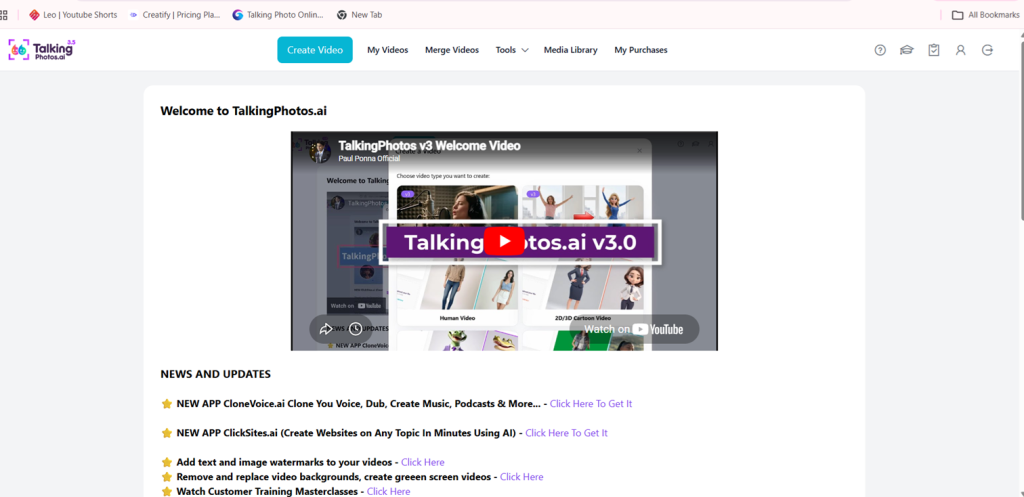
Multi-Scene Video Creation
If Talking Photos is my most-used feature, multi-scene video creation is probably my second most-used capability.
In many ways, it changed how I use the platform.
Rather than creating a single clip, I can create multiple scenes and customize each one independently.
For example:
- Different styles
- Different movements
- Different gestures
- Different backgrounds
- Different dialogue
Once completed, those scenes can be combined into a complete video.
My Experience
This became particularly valuable as my projects became longer and more structured.
Instead of:
One Clip → One Message
I could create:
- Introduction
- Main Content
- Supporting Information
- Closing Message
Each scene can have its own visual identity and presentation style.
This significantly expanded what could be created inside the platform.
For me, this remains one of the most valuable workflow improvements introduced since launch.
Personal Rating: 9/10
[IMAGE PLACEHOLDER #14]
Storyboard Example
Purpose:
Show scene-by-scene workflow.
Built-In Video Merger
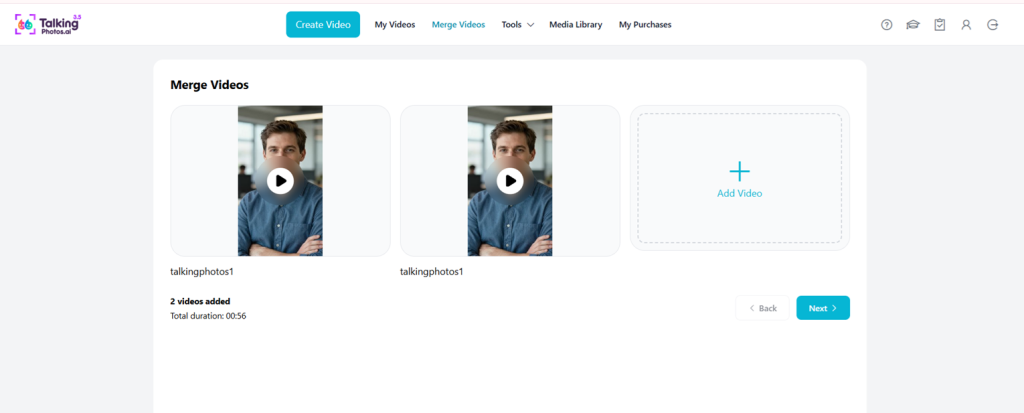
The built-in merger complements the multi-scene workflow by allowing multiple generated clips to be combined into longer productions.
My Experience
As movement options and scene customization improved, this feature became increasingly useful.
Today, I often create several short scenes with different gestures and actions, then merge them into a single production.
This dramatically expands the type of content that can be created.
Without the merger, creating longer structured videos would be far more difficult.
Personal Rating: 8.5/10
Combine Multiple Clips
Purpose:
Show how multiple scenes can be merged.
Subtitles & Captions
Captions are increasingly important for online video.
Many users watch content with the sound muted.
My Experience
This feature is particularly useful for:
- Social media content
- Educational videos
- Informational content
- Accessibility improvements
Adding captions can improve both usability and viewer retention.
Personal Rating: 8/10
Face Swap & Avatar Swap
The platform includes both Face Swap and Avatar Swap capabilities.
These features allow users to alter character appearances and experiment with different visual styles.
My Experience
I’ll be honest here.
These are not features I use regularly.
They are available and functional, but they haven’t played a major role in my own workflow compared to Talking Photos and multi-scene creation.
For users interested in experimentation, however, they add additional creative flexibility.
Personal Rating: 7.5/10
AI Image Generation
The platform also supports AI-generated images and characters.
This can be useful when users don’t have their own images available.
My Experience
Personally, I tend to start with custom photos more often than AI-generated characters.
However, having both options available increases flexibility and allows projects to move forward even when source images aren’t available.
Personal Rating: 8/10
Commercial Use Rights
One feature that is often overlooked is commercial usage.
The platform includes commercial rights according to the current license terms.
My Experience
For creators, marketers, agencies, and business owners, this is an important consideration.
The ability to use generated content commercially increases the overall value of the platform.
Personal Rating: 9/10
Unlimited Video Rendering
The platform includes unlimited rendering under its usage guidelines.
My Experience
As someone who has created more than 200+ videos, this matters.
Content creation involves experimentation.
Not every first attempt becomes the final version.
Sometimes a script needs adjustment.
Sometimes a movement looks better in a different style.
Sometimes several versions need to be tested before finding the best result.
Having the ability to create multiple versions without constantly worrying about rendering limits has been beneficial over the long term.
Personal Rating: 9/10
Feature Summary
After nearly two years of use and more than 200+ videos created, the features and workflows that have delivered the most value in my own projects are:
- Talking Photos
- Multi-Scene Video Creation
- Upload Your Own Photos
- Built-In Video Merger
- Upload Your Own Voice
- Commercial Usage Rights
- Subtitles & Captions
While the platform includes many additional capabilities, these are the features I return to most frequently when creating content.
What I Like Most About TalkingPhotos AI
After nearly two years of use and more than 200+ videos created, several things stand out.
Interestingly, not all of them are features.
Some of the biggest reasons I continue using the platform have more to do with usability, flexibility, and long-term development than any individual tool.
1. The Software Has Continued To Evolve
If you’ve purchased software for any length of time, you’ve probably experienced this before.
A product launches.
The marketing is impressive.
The feature list looks strong.
The early excitement is high.
Then six months later very little changes.
Then a year later development appears to slow significantly.
One reason TalkingPhotos AI has remained useful to me is that I have personally seen the platform continue evolving.
Since purchasing it as a Founder Member, I’ve observed:
- New features
- Additional movement options
- Expanded dancing capabilities
- Better scene-building workflows
- More creative flexibility
- Improved overall usability
The software I use today is noticeably more capable than the software I originally purchased.
That continued development is one of the biggest reasons I still use it regularly.
2. Talking Photos Remain Surprisingly Useful
Some features sound impressive on a sales page.
Other features become valuable because you actually use them repeatedly.
Talking Photos falls into the second category.
Even after nearly two years, it remains the feature I use most frequently.
The reason is simple.
It solves a practical problem.
Instead of:
- Recording
- Retaking
- Editing
- Rendering
I can often create content much faster using a talking character.
Does it replace traditional video production?
No.
But it provides a practical alternative for many types of content.
For quick explainers, promotional videos, social messages, and personalized greetings, it remains one of the fastest workflows available inside the platform.
3. Creating Videos Scene By Scene Changed My Workflow
If I had to identify the capability that increased my usage the most, it would be multi-scene video creation.
When I first started using TalkingPhotos AI, most projects consisted of a single talking clip.
That was fine for basic content.
As my projects became more ambitious, I wanted to create:
- Longer explainers
- Structured presentations
- Story-driven videos
- Educational content
- Awareness campaigns
The ability to build videos scene by scene completely changed what was possible.
One thing I particularly like is that each scene can be customized independently.
For example:
Scene 1:
Professional presenter
Scene 2:
Business explanation
Scene 3:
Educational walkthrough
Scene 4:
Call to action
Each scene can use:
- Different styles
- Different movements
- Different gestures
- Different backgrounds
- Different dialogue
Once completed, everything can be combined into a single project.
This dramatically expanded the type of content I could create.
Today, this remains one of my most-used workflows.
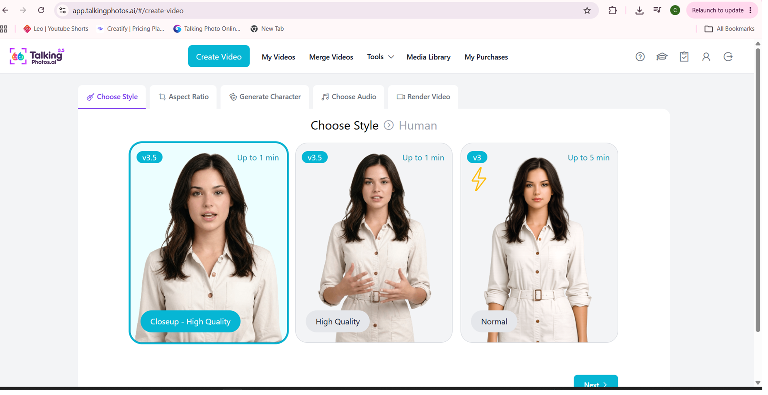
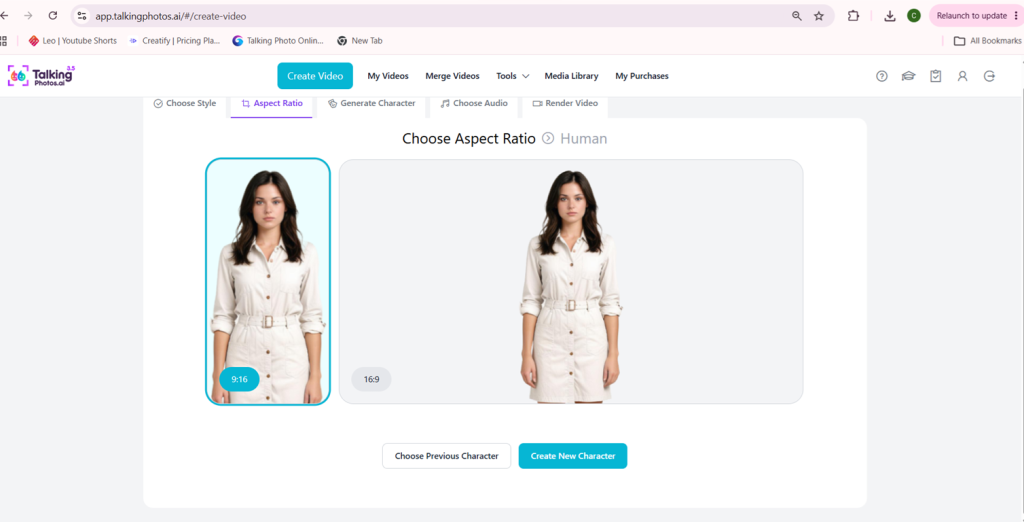
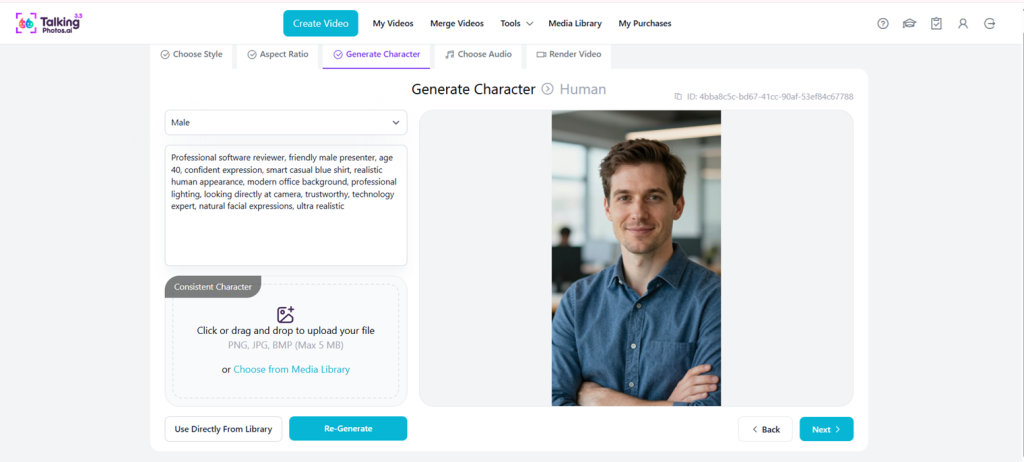
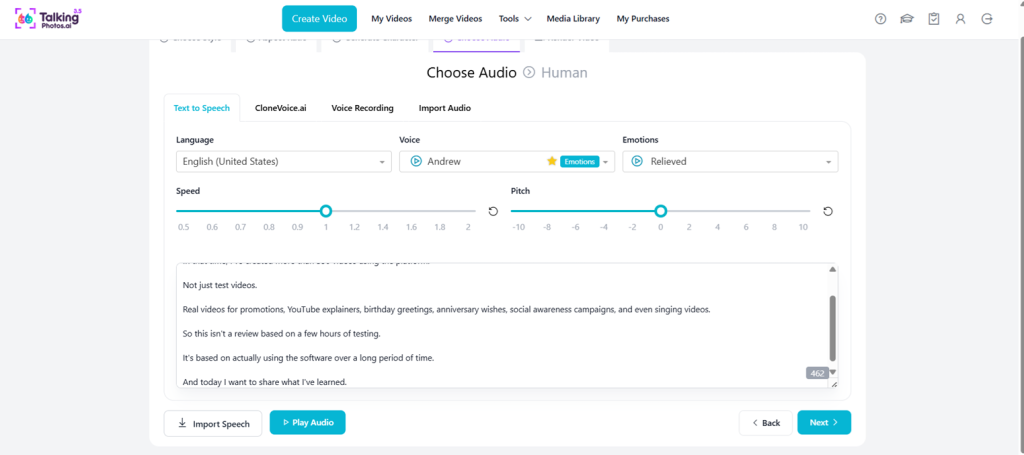
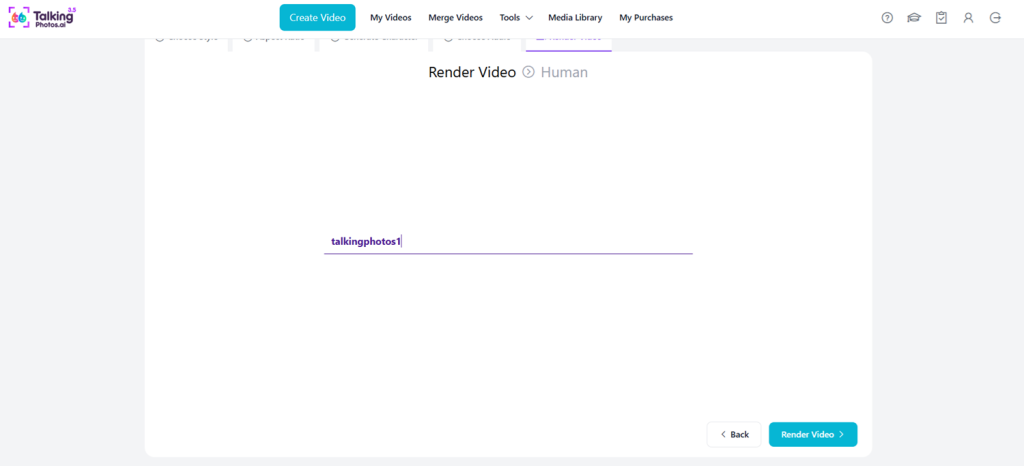
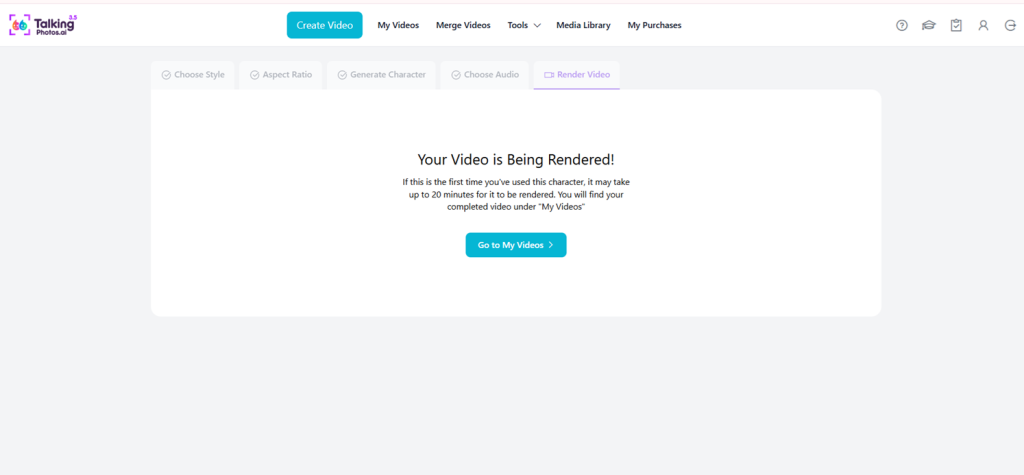
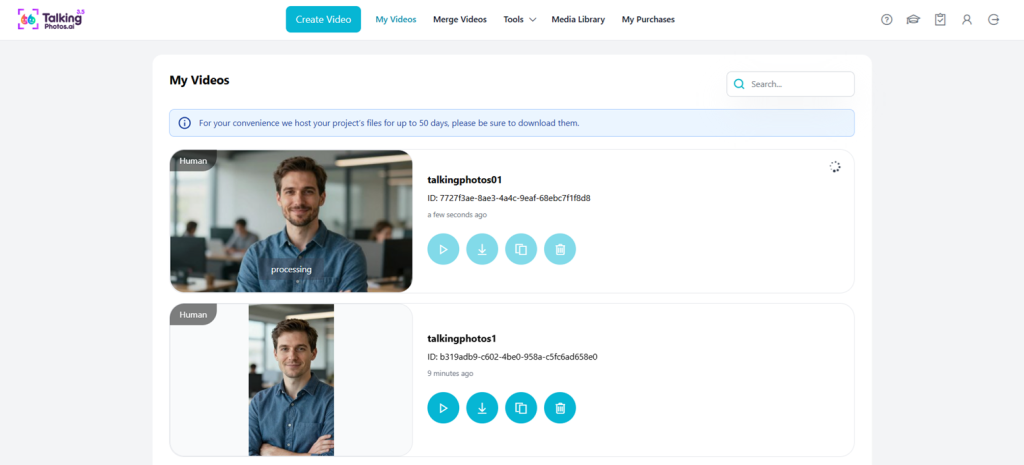
Dashboard Overview
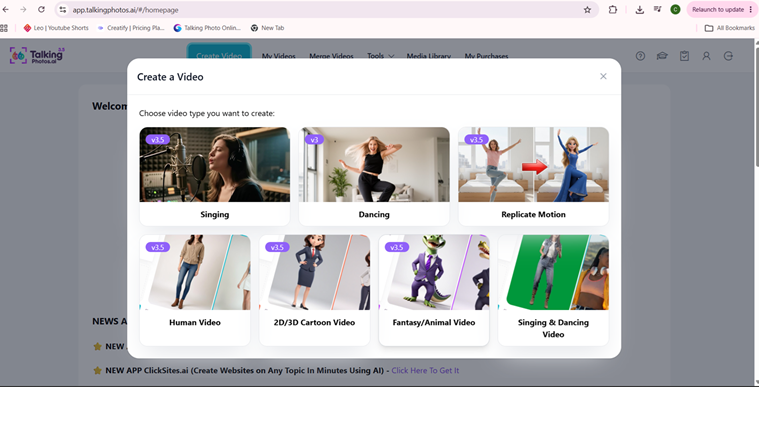
Creation Flow
4. The One-Time Payment Model
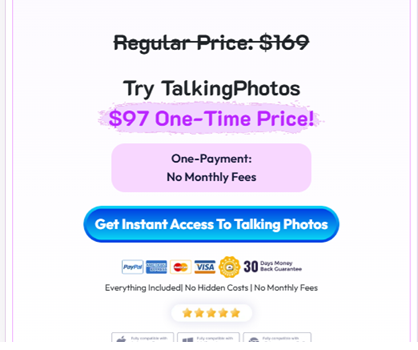
Another aspect I personally appreciate is the one-time payment model.
Many AI tools today operate entirely on recurring subscriptions.
That model works well for some users.
Personally, I like having the option to make a one-time purchase and continue using the software.
As someone who purchased the Unlimited Plan, I appreciate not having another monthly bill attached to my content creation workflow.
Over time, that becomes increasingly valuable.
Especially for creators who plan to use the software for months or years rather than a few weeks.
5. Useful Across Multiple Types Of Content
Most software products have a single primary use case.
TalkingPhotos AI has been useful across several.
I’ve personally used it for:
- Promotional videos
- YouTube explainers
- Talking avatar content
- Birthday greetings
- Anniversary wishes
- Social awareness campaigns
- Singing videos
- Educational content
That versatility has increased the overall value I’ve received from the software.
The more ways a tool can be used, the easier it becomes to justify keeping it as part of your workflow.
What Could Be Better
No software is perfect.
While my overall experience has been positive, there are still areas where I would like to see additional improvements.
1. More Detailed Body Movement Controls
This is probably my biggest feature request.
Movement options have improved considerably since launch.
There are more actions, more dancing styles, and more visual variety than when I first started using the software.
However, I would still like to see more granular control over body movements.
For creators who want very specific gestures and character performances, additional customization would provide even greater flexibility.
2. More Character Animation Customization
Closely related to movement control is animation customization.
The platform already offers a variety of actions and presentation styles.
I would personally enjoy even more control over:
- Gestures
- Hand movements
- Body positioning
- Character behavior
- Scene transitions
This would help creators produce more unique outputs and create videos that feel even more personalized.
3. Longer Native Video Lengths
The current workflow already provides a practical solution through multi-scene creation and the built-in video merger.
By combining multiple scenes, users can create significantly longer videos.
Even so, longer native clip durations would simplify some projects and reduce the need for scene segmentation.
This isn’t a major limitation because the existing workflow already solves the problem reasonably well.
However, additional flexibility would still be welcome.
Honest Pros & Cons
Pros
✓ Founder-member software that has continued evolving
✓ Talking Photos remain highly practical
✓ Multiple content creation formats
✓ Human, animal, object, and fantasy characters
✓ Upload your own photos
✓ Upload your own voice
✓ Singing videos
✓ Dancing videos
✓ Multi-scene video creation
✓ Built-in video merger
✓ Commercial-use rights
✓ Unlimited rendering
✓ One-time payment model
✓ Active development since launch
✓ Useful for both personal and business projects
✓ No steep learning curve
Cons
✗ More detailed movement controls would be useful
✗ Additional gesture customization would improve creative flexibility
✗ Longer native video lengths would be welcome
✗ Some advanced creators may want more manual animation control
✗ Results depend heavily on source images and input quality
Comparison: Launch-Day Features Vs Long-Term Product Development
Most software reviews focus on features.
That’s understandable because features are easy to compare.
However, after buying software for many years, I’ve found that another factor often matters more.
Long-term development.
A feature only provides value if the software continues evolving.
Many products launch with impressive capabilities.
The more important question is:
What happens after launch?
Does development continue?
Do updates arrive?
Does the software improve?
For me, one of the biggest strengths of TalkingPhotos AI has been its continued evolution.
The platform I use today is more capable than the platform I originally purchased.
That matters.
Because long-term value is created through continuous improvement rather than launch-day promises alone.
Comparison: A Simpler Purchase Structure
Another aspect I appreciated was the relatively straightforward purchase experience.
Without naming specific platforms, many software launches can become difficult to evaluate because functionality is spread across numerous upgrades.
As a buyer, it can sometimes be difficult to determine:
- What is included
- What is optional
- What requires additional purchases
- What the final cost will actually be
My experience with TalkingPhotos AI felt simpler.
I purchased the Unlimited Plan because it aligned with how I intended to use the software.
I didn’t feel like I needed to work through a long upgrade journey simply to access the functionality I wanted most.
As a customer, I appreciate clarity.
I want to understand what I’m buying and how I can use it.
That straightforward approach was another positive aspect of the overall experience.
A Personal Observation After Years Of Buying Software
One observation I’ve made over the years is that many software products generate significant excitement during launch.
Some perform well initially but gradually become less active over time.
Updates slow down.
Development becomes less visible.
The product eventually fades from regular use.
TalkingPhotos AI has been different in my experience.
Nearly two years after purchasing it as a Founder Member, I am still actively using it.
More importantly, the platform itself has continued evolving.
That continued development is one of the strongest indicators of long-term value for any software product.
And it’s one of the main reasons this tool remains part of my workflow today.
Pricing & Value Analysis
At the time of writing, TalkingPhotos AI is available through a one-time payment model rather than a mandatory monthly subscription.
Pricing and plans may change over time, so readers should always verify the latest details directly before purchasing.
When evaluating software, I generally don’t judge value purely by the purchase price.
I look at usage.
In my case:
- Founder Member
- Unlimited Plan Owner
- Nearly 2 Years Of Usage
- More Than 200+ Videos Created
When viewed from that perspective, I feel I’ve received substantial value from the software.
Someone creating only a few videos per year may reach a different conclusion.
However, for users who expect to create content regularly, the one-time payment model becomes increasingly attractive over time.
The more frequently you use the software, the lower the effective cost per project becomes.
One thing worth mentioning is that my evaluation of value isn’t based solely on the number of videos created.
It’s also based on:
- Time saved
- Reduced recording requirements
- Ability to create content without appearing on camera
- Flexibility across multiple content types
- Continued updates after purchase
Taken together, those factors contribute significantly to the value I’ve received from the platform.
Pricing & Plan Screenshot
Purpose:
Show current offer structure.
[IMAGE PLACEHOLDER #16]
Unlimited Plan Confirmation
Purpose:
Support ownership claims.
Who Should Use TalkingPhotos AI?
After nearly two years of use, I don’t think TalkingPhotos AI is for everyone.
Like any software, it works best when matched with the right type of user.
Based on my experience, I believe it is best suited for people who regularly create content and can take advantage of its flexibility.
Content Creators
If you’re constantly producing content for social media, blogs, YouTube, or online communities, TalkingPhotos AI can help reduce the amount of time spent recording videos.
The ability to create talking videos from photos makes it easier to publish content consistently.
Affiliate Marketers
Affiliate marketers often need:
- Product explanations
- Promotional videos
- Demonstrations
- Educational content
TalkingPhotos AI provides an alternative to constantly recording yourself on camera.
I’ve personally used it for promotional content and explainer-style projects, which makes this one of the most natural use cases.
YouTubers
I’ve personally used it for YouTube explainer videos.
For creators who prefer narration, avatar-style presentations, educational content, or faceless channels, the platform can become a useful addition to the workflow.
Educators & Trainers
Educational content is another natural fit.
The combination of:
- Talking avatars
- Multi-scene video creation
- Captions
- Voice options
makes it easier to create structured informational videos.
Small Business Owners
Business owners who want to create:
- Announcements
- Promotional messages
- Customer communication videos
- Informational content
may find value in the platform without investing heavily in traditional video production.
Agencies & Freelancers
Commercial-use rights make the platform relevant for service providers creating content for clients.
Whether you’re producing promotional videos, presentations, or social content, the software can help streamline content production.
Who Should Probably Skip It?
Being honest about who a product is not designed for is just as important as discussing who should use it.
Professional Animation Studios
If your work requires frame-by-frame animation control, advanced motion design, or cinematic production workflows, this software is not intended to replace professional animation tools.
Film Production Teams
TalkingPhotos AI is a content creation platform.
It is not a substitute for professional film production software.
Users Seeking Complete Manual Control
The platform uses AI to automate many parts of the creation process.
Users who want complete manual control over every movement, gesture, and animation detail may find that level of automation limiting.
People Who Rarely Create Content
If you only expect to create a handful of videos each year, you may not receive the same value as someone creating content consistently.
Frequently Asked Questions
Is TalkingPhotos AI beginner-friendly?
Yes.
Most projects can be created without advanced video editing experience.
The workflow is generally straightforward and suitable for beginners.
How long have you been using TalkingPhotos AI?
I purchased it as a Founder Member shortly after launch and have been using it for nearly two years.
Which plan do you own?
I personally own the Unlimited Plan.
Approximately how many videos have you created?
More than 200+ videos, including experiments, test projects, promotional content, greetings, and real-world projects.
What are your most-used features?
The features and workflows I use most frequently are:
- Talking Photos
- Multi-Scene Video Creation
- Upload Your Own Photos
- Built-In Video Merger
- Upload Your Own Voice
What types of videos have you created?
I’ve used the platform for:
- Promotional videos
- YouTube explainers
- Birthday greetings
- Anniversary wishes
- Social awareness content
- Talking avatar videos
- Singing videos
Does TalkingPhotos AI support custom photos?
Yes.
Users can upload their own photos and create videos using those images.
Can I upload my own voice?
Yes.
The platform supports custom voice uploads.
Does it include text-to-speech?
Yes.
Users can generate speech from written text.
Can it create singing videos?
Yes.
AI singing videos are one of the available content formats.
Can it create dancing videos?
Yes.
The platform supports dancing animations and movement-based content.
Can it create talking animal videos?
Yes.
Animal characters are supported alongside human characters.
Can it create talking object videos?
Yes.
Object-based characters can also be animated.
Does it support multiple languages?
Yes.
Multi-language content creation is supported.
Can I create commercial content?
Yes.
Commercial-use rights are included according to the platform’s licensing terms.
Is the multi-scene workflow worth using?
For me, absolutely.
Being able to create multiple scenes with different styles, movements, backgrounds, and messages, then combine them into a longer production, has become one of the most valuable parts of my workflow.
What improvements have you noticed since launch?
The biggest improvements I’ve personally noticed include:
- Better body movements
- More dancing options
- Improved multi-scene workflows
- More creative flexibility
- Easier creation of longer videos
What would you like to see improved?
My biggest request would be more detailed body movement and gesture customization.
Is it subscription-based?
At the time of writing, the platform is available through a one-time payment model.
Always verify current pricing before purchasing.
Why did you choose the Unlimited Plan?
Because I expected to create content regularly and wanted broader access for experimentation and long-term projects.
Is this review based on actual use?
Yes.
This review is based on nearly two years of usage, Founder Member ownership, Unlimited Plan ownership, and more than 200+ videos created.
Final Verdict
When I purchased TalkingPhotos AI as a Founder Member, I expected to use it mainly for simple talking videos.
What I didn’t expect was that nearly two years later I would still be using it regularly.
Over time, the software became useful for far more than I originally planned.
I’ve used it for:
- Promotional videos
- YouTube explainers
- Personalized greetings
- Social awareness campaigns
- Singing videos
- Educational content
- Talking avatar presentations
The feature that has delivered the most value is Talking Photos.
The capability that most changed my workflow is the ability to create videos scene by scene and combine them into longer productions.
Together, those capabilities allowed me to move beyond simple talking clips and create more structured, engaging content.
However, if I had to identify the single biggest reason I continue using the platform, it would not be a specific feature.
It would be continued development.
One lesson I’ve learned after purchasing software for many years is that launch-day features matter less than long-term evolution.
The platform I use today is more capable than the platform I originally purchased.
That ongoing improvement has been one of the most valuable aspects of the experience.
Final Score: 8.7/10
For content creators, affiliate marketers, educators, YouTubers, agencies, small businesses, and anyone interested in creating talking video content without constantly recording themselves on camera, TalkingPhotos AI remains one of the more practical AI video tools I’ve personally used.
Affiliate Disclosure
This article may contain affiliate links.
If you purchase through one of these links, I may earn a commission at no additional cost to you.
This helps support the time required to test software, create content, and maintain this website.
All opinions expressed throughout this review are based on my personal experience using the software.
Review Methodology
This review is based on:
- Founder Member ownership
- Unlimited Plan ownership
- Nearly two years of use
- More than 200+ videos created
- Personal testing across multiple use cases
- Real-world content creation projects
The opinions expressed are based on my own experience and may differ from those of other users.
Author Experience Statement
I purchased TalkingPhotos AI shortly during launch as a Founder Member and continue to use it today.
The experiences shared throughout this review are based on actual usage across promotional videos, YouTube explainers, talking avatar projects, birthday greetings, anniversary wishes, social awareness campaigns, singing videos, and other real-world content creation projects.
Last Updated: June 2026
Lorem ipsum dolor sit amet, consectetur adipiscing elit. Ut elit tellus, luctus nec ullamcorper mattis, pulvinar dapibus leo.