BizinGPT Review 2026: Features, Pricing, Coupons & Bonuses
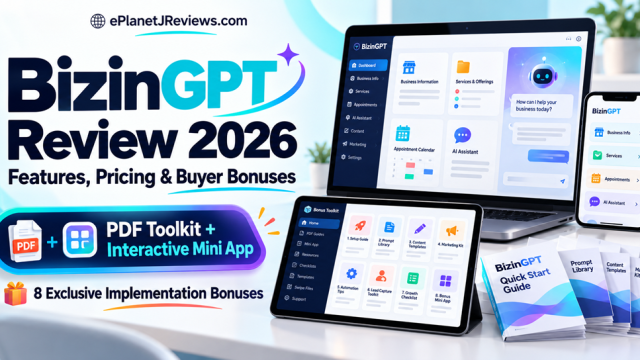

BIZINGPT REVIEW 2026 · FEATURES, PRICING & BUYER BONUSES
BizinGPT Review 2026:
Would I Build a Client Service Around It?
BizinGPT caught my attention because it goes beyond writing business content. It is designed to connect business information to a working customer experience. The real question is what happens after the demo.
WATCH THE BIZINGPT SALES PRESENTATION
Vendor sales presentation. The separate product demo appears in the How It Works section. Playback depends on Vimeo availability and permissions.
This review is based on vendor materials and supplied page assets, not hands-on product testing. We may earn a commission if you buy through our links, at no extra cost to you.
MY FIRST IMPRESSION
The demo is interesting. The service behind it matters more.
I can see why this offer will appeal to marketers who work with local businesses. A restaurant has a menu. A salon has services and available appointments. A property agent has listings. Those are useful facts that customers ask about every day.
Being able to connect those facts to an AI conversation is a more concrete idea than asking a business owner whether they want “some AI.” You can show a customer task, the information behind the answer and the next step.
That is what interests me about BizinGPT. The sales material describes an assistant that helps you choose a template, connect business data and build the integration through chat, voice or forms.
But I would not confuse a smooth demonstration with a finished client service. Somebody still needs to check the source information, test the answers, explain the boundaries and keep the data current. If a class is canceled or a price changes, the integration needs to handle that properly.
I have reviewed the supplied pages, kit and assets. I haven’t connected a client account or measured results inside BizinGPT, so this is an assessment of the offer rather than a claim that I have personally earned with it.

THE PRODUCT IN PLAIN LANGUAGE
What is BizinGPT actually trying to do?
Think of a business’s approved information as the starting point: a list of services, a timetable, a product catalog or a set of property listings.
BizinGPT is designed to help turn that information into an integration with a defined customer workflow. A person could ask about an item, see relevant details and continue to the business’s own booking, checkout or enquiry destination.
The vendor uses the word “plugin” throughout its material. For a buying decision, I would focus on the workflow being demonstrated, the supported account requirements and how people will actually access it.
There are three milestones I would keep separate:
- A private test works. You have connected the integration in a supported test environment and checked its behavior.
- The integration is ready for its intended distribution. Any required review, permissions and account setup have been addressed.
- Customers discover and use it. That still depends on distribution, relevance and the way people reach the experience.
Completing the first milestone does not automatically complete the other two. I would not sell “we’ll make ChatGPT recommend your business” as if installing an integration guarantees it.
THE SETUP FLOW
How I would approach the first build
1. Choose the business and one customer question
The advertised setup begins by describing the business to the AI assistant or choosing a template manually. The core template list covers restaurants, real estate, home services, salons, gyms, ecommerce, websites and SaaS.
I would be more specific than “build one for a restaurant.” For a first version, I might want customers to find vegetarian dishes and then open the restaurant’s own ordering page. That gives the integration a clear job and gives me a way to test it.

2. Connect a reliable source
The materials describe sources such as Google Sheets, Google Calendar, website sitemaps, CSV and manual entry. Other connectors appear in the upgrade descriptions. Check the edition you are buying rather than treating every connector mentioned anywhere in the launch as a core feature.
A live connection can only be as useful as the source behind it. If the owner’s spreadsheet still shows last month’s prices, the fact that it synchronizes does not make the information correct.
I would agree which source wins when records conflict, who updates it and what the response should do when a fact is missing.

3. Preview, test and prepare the next step
BizinGPT advertises a preview, an instant test link, a compliance checker and materials to help with submission. Those features could reduce the amount of setup an operator has to assemble separately.
I would use the preview to check ordinary questions and difficult ones. What happens when a service is unavailable? Does an unknown price become an invented price? Does the integration say a booking is confirmed when it has only opened a link?
The vendor’s own FAQ acknowledges that approval is not guaranteed. Treat any submission assistance as help preparing the work, not a promise of acceptance.
Watch the product demo
See the supplied demonstration alongside the setup steps above. Check the data connection, returned information and handoff before deciding what you would offer a client.
Vendor-supplied demo. Open on Vimeo.
WHERE I SEE THE PRACTICAL VALUE
The BizinGPT features I would examine first
Chat and voice building
The assistant-led approach could be useful for a first-time user because it asks for business details instead of handing over an empty technical configuration screen. Voice could also make a demonstration easier when you are with an owner.
I would still read back the configuration before testing it. Being able to describe a task naturally is helpful; it does not remove the need to check whether the system understood the task correctly.
A manual builder when you want more control
There is also a form-based route. I like having that choice. Some people prefer conversation to get started, then want a clear place to inspect and change the details. I would look for how easily I can understand the final setup, whichever route I use.

Business-specific presentation
The vendor describes cards for products, listings, services, available slots and plan comparisons. That could make an answer more useful than a long paragraph when the customer is trying to compare options.
My test would be simple: is the right item shown, is its information accurate, and does the next button lead where it says it will? Presentation helps when those basics are right.

Hosting and monitoring
Hosting is described as included in the plan, alongside monitoring. That is attractive for someone who does not want to manage the underlying infrastructure.
Before building a paid service around it, I would check the current hosting terms, account allowances and support process. I would also want to know what I can export, what the owner controls and how a client would move away if the arrangement ends.
Readiness checks and submission materials
The readiness audit may provide a starting point for a conversation with a business owner. I would use it to discuss the specific customer task the business could support, rather than telling every owner they are missing out on guaranteed customers.
Likewise, generated descriptions, prompts and privacy or support pages can save drafting time. They still need to match the real data collection and operating arrangements. I would not treat generated policy text as a substitute for understanding the project.
The commercial license
The FE advertises permission to build integrations for clients. That is useful if client work is your plan, but a license and a client are different things. You still need to find a suitable project, agree what you will deliver and support it competently.
The reseller offer is separate in the agency upgrade. Building a client’s integration and selling software accounts are two different business models, with different responsibilities.
A SMALL PROJECT I CAN PICTURE
What I would build before offering this to clients
Imagine a small yoga studio with a well-maintained class catalog and its own booking system. I would begin with a read-only experience: find a beginner class, explain the class from the approved description and open the studio’s booking page.
I would not start by promising direct reservations, payment processing, health advice and several extra channels. Each additional promise adds something else to verify.
For that first project, I would check at least these questions:
- Does the answer preserve the class name, price and currency?
- What happens when the timetable changes?
- Can a paused class still be presented as available?
- Does the customer reach the correct booking page?
- Does the response clearly distinguish a booking link from a confirmed reservation?
- Who handles an incorrect answer after handover?
If those checks pass, I have something understandable to show the owner. If they do not, I have specific work to do before calling it ready.
This is the thinking behind our buyer bonuses. The software may help build the integration. The bonus toolkit helps organize the decisions, evidence and follow-through around it.
The yoga studio is a fictional example, not a client case study or a reported BizinGPT result.
THE BUYING DECISION
What I like, and what I would be careful about
What makes the offer interesting
A concrete use case. Product information, schedules and booking handoffs are easier to understand than vague AI positioning.
Connected business data. A maintained source is more useful than repeatedly copying facts into a conversation.
Guidance through setup. Templates, a build assistant and submission materials could reduce unfamiliar setup work.
More than one route to use it. An owner can investigate their own workflow; a capable service provider can evaluate a client project.
Where I would slow down
Access and approval. A private test is not a promise of public listing or recommendation.
Edition boundaries. Extra channels and some connectors appear in upgrades.
Changing business facts. Someone has to maintain them and handle errors.
Sales-page inconsistencies. Some limits and pricing statements contain placeholders or differ across the supplied material. Confirm the parts that matter before paying.
Who I think it suits
A freelancer or agency already working with local business data has a recognizable place to start. A store owner or SaaS founder with a clear customer task can also evaluate the software against their own needs.
A beginner can investigate the setup, but “no code” does not mean there is nothing to learn. You still need to understand the data, the task and the limits of what you are offering.
If your main expectation is that buying the software will automatically bring customers, I would reset that expectation before looking at any package.
FE VS BUNDLE
BizinGPT pricing: what changes with the Bundle?
The supplied Commercial page advertises $37 one time before coupon. The supplied Bundle page advertises $317 one time and says there are no monthly fees for that Bundle purchase. Our promotion codes are BIZINGPT4 for $4 off the FE and BIZBUNDLE for $50 off the Bundle. These are page quotations checked for this draft, not a promise that checkout will stay at those amounts.
| Compare | Commercial / FE | Complete Bundle |
|---|---|---|
| Core purpose | Build and test a business integration for ChatGPT | Core platform plus five upgrade categories |
| Advertised price in supplied pages | $37 one time before coupon | $317 one time before coupon; BIZBUNDLE is supplied for $50 off |
| Build methods | Chat/voice assistant and manual builder | Same core methods, plus Pro features |
| Templates and capacity | Core business templates; exact current plan caps need confirmation | Pro Unlimited and premium niches advertised; check fair-use and current package terms |
| Data connections | Core sources described; some broad FE mentions overlap with Pro descriptions | Pro lists Shopify, Airtable, Calendly and Notion among premium connectors |
| Extra channels | Do not assume Claude, website chat or Telegram are included | AI Everywhere: Claude connector, website chat widget and Telegram assistant |
| Client prospecting | Basic readiness audit described | Client Hunter: business finder, bulk audits, personalized pitch assistance and pipeline |
| Campaign / service resources | FE vendor bonuses are listed separately | DFY Vault + Pitch Kit: extra niche templates, scripts, proposals, pricing and onboarding resources |
| Agency and resale | Commercial license for client builds advertised; software resale is separate | Agency + Reseller: client portal, billing/reporting and account-resale rights, subject to license |
| Our buyer bonus | Eight PDF resources + the interactive HTML mini app | The same dual-format implementation suite |
| Advertised guarantee | 30 days, subject to current vendor policy | 30 days, subject to current vendor policy |
Pro Unlimited
This is the expansion for capacity, additional niches, language/location support and advanced functions. The exact conditions matter more than the word Unlimited. Check the current license and allowances if you plan to take on several clients.
AI Everywhere
This is the important distinction for anyone attracted by the four-channel pitch. Claude, a website widget and Telegram are described under this upgrade. I would not describe the $37 entry offer as including the complete four-channel package.
Client Hunter and the DFY Vault
Client Hunter is positioned around finding businesses and preparing outreach. The Vault and Pitch Kit add niche templates and service-selling resources. Those may help someone who knows whom they want to approach, but they do not establish that a prospect has consented, is interested or will become a client.
Agency + Reseller
This adds agency operations and software resale. Before using it, I would read how accounts are provisioned, who supports buyers and what branding rights are actually granted.
Which package would I consider?
The FE is the one I would inspect for a small, focused test if its confirmed limits cover the project.
The Bundle deserves a look if you have a genuine need for extra channels, capacity, agency tools or resale rights. I would make that list before checkout rather than buying the larger package because it contains more items.
AFFILIATE-SUPPLIED DISCOUNT CODES
BizinGPT coupons: save on the package you choose
COMMERCIAL / FRONT END
BIZINGPT4
$4 off the FE offer. If the base price is still $37, that makes it $33 after the coupon is accepted.
COMPLETE BUNDLE
BIZBUNDLE
$50 off the Bundle. If the base price is still $317, that makes it $267 after the coupon is accepted.
Codes supplied for this promotion. Check the coupon is accepted and review the final checkout total, billing terms and any applicable taxes before paying. Base prices and coupon availability may change. Do not assume codes stack or work on a different package.
VENDOR-SUPPLIED EXTRAS
The BizinGPT general bonus apps
The vendor has also supplied a general bonus-app package for BizinGPT buyers. This is separate from our ePlanetJReviews PDF toolkit and Client Delivery Companion mini app.
The vendor describes access through the Bonuses tab in the BizinGPT members area after login. Confirm eligibility for your chosen package and the current access and license terms at purchase. The descriptions below summarize the supplied material; I have not independently tested these apps.
RetainerAI
Client acquisition and service management
The supplied description lists outreach tools, pitches, proposals, follow-up and recurring client plans with Stripe billing. It may support the administration around an integration service; it does not supply guaranteed clients or monthly income.
Vendor-stated value: $297AI Sales Script Writer
Calls, walk-ins, email and WhatsApp
Scripts, openers, follow-ups and objection-handling material that can be adapted to the niche. I would edit the claims and next step before using any script with a prospect.
Vendor-stated value: $97Mini Website Builder
A focused one-page business website
One-page templates with business details, images, contact information and booking or purchase links. That can provide a destination for the customer handoff when a business needs a simple page.
Vendor-stated value: $147Local Business Website Builder
Multi-page local business websites
Niche templates and page structures such as home, services, about, gallery and contact. Confirm hosting, publishing and license requirements before adding website delivery to a client package.
Vendor-stated value: $297AI Logo Maker
Logo concepts and downloadable formats
The supplied description lists style, color and font choices, plus square and wide downloads. Review the output and usage rights before treating a generated design as a finished client identity.
Vendor-stated value: $97Image Background Remover
Preparing product and listing photos
Background removal with plain, transparent or custom options. Check the resulting edges and whether the edited image still represents the actual product accurately.
Vendor-stated value: $67AI Graphics Designer
Marketing visuals and service promotion
Templates for posts, banners, flyers and thumbnails, with business text, logos and colors. Use wording that describes a connected or available integration accurately; avoid suggesting automatic public endorsement or recommendation.
Vendor-stated value: $147AI Demo Video Maker
Short prospect demonstrations
Video templates using scripts, screens, text and music, with export formats for outreach or social sharing. Clearly label fictional examples and staged demonstrations.
Vendor-stated value: $197AI Video Creator
Short-form campaign content
Text-to-video resources with vertical, square and wide formats, captions, transitions and music described. The useful question is whether the finished video explains the service clearly, not how many clips you can generate.
Vendor-stated value: $197AI Voiceover Tool
Narration for demonstrations and promotions
The supplied description lists voices, accents, languages, tone/speed controls and audio downloads. Check pronunciation, permissions and current use terms before publishing.
Vendor-stated value: $97I would check which apps I actually need before adding them to a client offer. Website hosting, connected accounts, media rights, billing setup and support responsibilities still matter, even when access to an app is included as a bonus.
EXCLUSIVE EPLANETJREVIEWS BUYER BONUSES
Eight implementation bonuses. PDFs and a working mini app.
When I planned this bonus package, I kept coming back to the same question: what will someone need after the exciting part of the demonstration?
They will need to choose a sensible project, gather reliable facts, test the journey and explain it to the owner. If they offer ongoing care, they will need a way to document that work too.

FORMAT 1
The PDF implementation toolkit
Eight six-page workbooks plus the four-page Start Here guide: 52 PDF pages in total. Each workbook has a framework, working steps, a fictional example, a worksheet and a reusable AI brief.
Keep them beside your project, print the worksheet you need or read through a process before you start.
FORMAT 2
The interactive mini app
A welcome screen, dashboard and eight working tools with project notes, local saving, generated working documents, a 24-case test bank, reports and backup/restore.
It runs in the browser using local rules and templates. It is not a connected AI service, BizinGPT account or automatic live integration tester.
What the eight bonuses help you do
Client Fit & Use-Case Scorecard
Score the project, record evidence and get a planning decision that respects missing permissions and unverified required actions.
PDF guide + mini app workspace
Suggested value: $97Live Data Preparation Kit
Check sample records for missing fields, duplicate IDs, price/currency issues, invalid-looking links and instruction-like text.
PDF guide + mini app workspace
Suggested value: $147Proof-First Demo Workshop
Build a short demo run sheet with ordinary questions, a difficult request, a fallback and a small pilot proposal.
PDF guide + mini app workspace
Suggested value: $127Integration Acceptance Test Vault
Record pass/fail results and evidence across 24 starter cases, then create a release-review document.
PDF guide + mini app workspace
Suggested value: $197Project Scope & Acceptance Builder
Generate an operational scope brief covering deliverables, exclusions, dependencies, tests and change handling.
PDF guide + mini app workspace
Suggested value: $197Client Handover & Operator Kit
Prepare the owner’s update instructions, fallback steps, support route and handover record.
PDF guide + mini app workspace
Suggested value: $147Monthly Care & Value Review Planner
Create a monthly care report from actual work and test counts, with checks for inconsistent numbers.
PDF guide + mini app workspace
Suggested value: $197Incident Recovery & Change-Control Playbook
Structure an incident record around containment, diagnosis, authorized fixes, retesting and restoration approval.
PDF guide + mini app workspace
Suggested value: $188How I would use the two formats together
I would read the Client Fit guide before deciding on a pilot, then complete its scorecard in the app. Next, prepare a small authorized dataset and use the data checker to catch basic issues before connecting anything.
After the demo, I would use the scope builder to write down what has actually been agreed. The acceptance workspace gives the test results a home. The handover, care and recovery tools keep the later work from becoming a collection of scattered messages.
The app also includes the PDF guides for download, and the package includes editable text templates. Project saving is local to the browser; export a backup when you want a portable copy.
Bonus eligibility and delivery
Our dual-format suite is offered to BizinGPT buyers through the ePlanetJReviews FE or Bundle links on this page. It is separate from the vendor’s own bonuses and does not increase your BizinGPT account limits or grant extra platform permissions.
Bonus delivery instructions will be confirmed with the purchase offer. Keep your receipt; this draft does not promise automatic fulfillment or a delivery time that has not been configured.
QUESTIONS BEFORE BUYING
BizinGPT review FAQ
What is BizinGPT?
BizinGPT is advertised as a no-code business integration builder with templates, supported data connections, hosting and testing/submission assistance. Its vendor uses the term plugin for the business experience it creates.
Does BizinGPT guarantee that ChatGPT will recommend a business?
No. Building and testing an integration is different from public approval, discovery and recommendation. Do not buy or sell it on the assumption that installation guarantees customers.
What is the BizinGPT launch price?
The supplied FE page advertises $37 and the Bundle page $317, both one time before discounts. BIZINGPT4 is supplied for $4 off FE; BIZBUNDLE for $50 off Bundle. If those base prices remain, accepted coupons produce $33 and $267 respectively. Verify the checkout total and billing terms.
Are Claude, website chat and Telegram included in the FE?
They are described as AI Everywhere upgrade features. Do not assume the entry offer includes the full four-channel package; compare the current plan details.
Does Shopify come with the entry package?
Shopify is mentioned broadly in FE copy but is listed as a premium connector in the Pro description. Verify its availability in the specific edition before paying for a project that depends on it.
Do I get both the PDFs and the mini app?
Yes. Our qualifying buyer bonus includes the eight-resource PDF toolkit and the interactive HTML mini app, along with the Start Here guide and editable templates. They are two formats for the same implementation suite.
Does the bonus mini app connect to BizinGPT or run AI?
No. It is an independent browser-based tool using local forms, calculations and templates. It stores project data locally when browser storage is available. It does not connect accounts, call an AI model or perform live integration tests.
What do the 24 acceptance tests do?
They give you starter cases and a place to record expected behavior, observed results and evidence. You run the real tests yourself. The app’s release summary is a planning aid, not certification or platform approval.
What does the vendor guarantee cover?
The pages advertise a 30-day money-back guarantee subject to the vendor’s applicable policy. Review the actual conditions and support process at checkout rather than relying on a shortened headline.
Is the bonus suite the same as the vendor bonuses?
No. Vendor pitch kits, training, templates and software upgrades are separate. Our suite is created by ePlanetJReviews and focuses on project fit, data, testing, scope, handover and maintenance.
MY FINAL TAKE
I would buy it for a clear workflow, not a promise of automatic clients.
The interesting thing about BizinGPT is that I can picture a practical first project: take a maintained set of business facts, build a useful customer experience around them and make the next step clear.
The assistant, templates, hosting and submission tools could make that easier to approach. For someone already working with local businesses, that is a reasonable reason to investigate the demonstration.
I would still start with the task, check the required edition and test the complete journey. If extra channels or agency operations are part of the plan, compare the Bundle carefully. If you only need one small pilot, first confirm whether the Commercial offer covers it.
Our bonuses are designed to help with the work surrounding that decision. You can read the method in the PDFs and use the mini app to keep the project organized.
Watch the videos near the top, check the current offer details and choose the package that matches the work you actually intend to do.