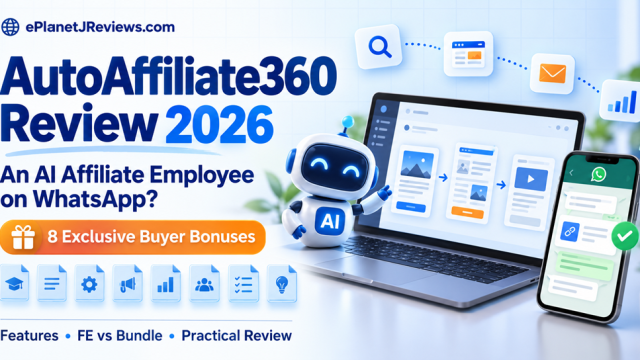
AutoAffiliate360 Review 2026: Powerful Features, Hidden Costs & 8 Bonuses
AUTOAFFILIATE360 REVIEW & BUYER BONUSES
Could you manage an affiliate campaign from WhatsApp?
Finding an offer is the easy part. Finishing the pages, emails and promotion takes work. Here’s my look at the AI employee built to bring those jobs together, including what I’d check before buying.
Independent review based on vendor materials, not hands-on testing. Affiliate links: we may earn a commission at no extra cost to you.
WATCH THE AUTOAFFILIATE360 PRESENTATION
Vendor presentation · Open on Vimeo
MY FIRST IMPRESSION
I can see the appeal. I would still start with one campaign.
There is a familiar kind of affiliate campaign that never gets launched. You find a product you like, save the link, start a page, write half an email and promise yourself you’ll finish the rest tomorrow.
Then another offer arrives.
That is the problem I had in mind while looking through AutoAffiliate360. The attraction is being able to keep the research, pages, lead magnet, emails and promotion together, then manage prepared work from the dashboard or WhatsApp.
If it brings those pieces together well, that could be useful. I would want to see a complete campaign make its way through the system before making it part of my routine.
I’m reviewing the product from its sales material and the presentation supplied for this page. I haven’t run my own campaign inside it, so you won’t find a claim here that it earned me commissions or saved me a measured number of hours.
Below, I’ll walk through what interests me, what I’d check first, and whether the FE or Bundle makes more sense for different buyers.

GETTING STARTED
From “what should I promote?” to a campaign you can review
First, find an offer that fits your audience
The built-in marketplace lets you search ClickBank, JVZoo and WarriorPlus. You can also paste an offer URL. Offers receive Hot or Good scores, and the dashboard highlights a weekly pick.
I’d use that to make a shortlist. Then I’d ask the questions I would ask anyway: do I understand this product, can I reach people who need it, and can I explain it honestly?
A high commission or an attractive marketplace score does not answer those questions for you.

Next, give the campaign builder something clear to work with
Once you choose the offer, the builder is meant to research it and prepare the campaign around it. That can include opt-in and thank-you pages, quizzes, a bonus page, lead magnets and follow-up emails. There is a webinar funnel option too.
What I like about this approach is the possibility of keeping the message consistent. The post, landing page, free resource and email sequence should feel like parts of the same conversation.
I would give it one audience, one main problem and verified product information. Asking for everything at once makes it harder to notice where the message goes off track.

Finally, check the work before saying LAUNCH
You can review work on the web or use WhatsApp commands such as LAUNCH, PAUSE, RESUME and REJECT. I can see myself using the phone connection to check progress or approve something I have already reviewed.
I would still open the actual pages and emails first. A short approval message can authorize quite a lot of work.

WHAT CAUGHT MY ATTENTION
The parts I would spend time with first
The WhatsApp connection
This is probably the feature people will remember. Connect through a QR code, send instructions, check what needs attention and respond to plans from your phone.
That sounds convenient for someone fitting marketing around a job or client work. The useful question is how much you can understand from the message before approving it.
AutoAffiliate360 describes three modes: Copilot suggests actions, Assisted stages them for review, and Autopilot runs pre-approved actions. There is also an action history and a kill switch. I would begin with Assisted, learn what each permission allows, and only loosen control when I was comfortable with the results.

Lead magnets and bonuses that belong with the offer
The system can generate resources such as ebooks, checklists, mini courses, quizzes and templates. That could make it easier to finish an incentive you have been putting off.
But I would read it as a buyer. Does it help with a specific problem? Is the advice accurate? Does it lead naturally toward the product?
A checklist that helps somebody make a decision can be more useful than a long ebook they never open. I’d rather have one good resource than a library of filler.
A follow-up sequence you can edit
The seven-email structure covers welcome, value, story, proof, objections, urgency and a final reminder. It gives you a shape to work with, which is helpful when the alternative is an empty email editor.
The editing still matters. A “proof” email needs real evidence. An urgency email needs an actual deadline. If either is missing, change the message instead of letting the template invent a reason to buy.
Sending requires a connected email service. The listed options include Mailchimp, GetResponse, Kit, ActiveCampaign, Brevo and webhooks. Check the connection and its separate costs before assuming everything is handled by this purchase.

A plan for getting the campaign seen
The Traffic Hub covers content and scheduling across Facebook, Instagram, TikTok, LinkedIn, Pinterest, X, YouTube, Reddit and Threads. It also describes keyword-mention discovery, drafted replies and optional Meta ads.
This is where I would resist the temptation to do too much. A new campaign does not need nine neglected channels. It needs a sensible place to start and content that earns attention there.
For community replies, I would check the conversation and the rules myself. Sometimes the helpful answer includes a resource. Sometimes the useful thing is simply answering the question without a link.
The software can support the activity. Getting the right people to care about the offer remains the marketing job.

Webinar pages without another disconnected project
The webinar option includes a registration page and a presentation or replay room with video, calls to action, viewing statistics and live chat. AI can draft replies from material you provide.
I can see a use for this when a product needs explaining. Before inviting anyone, I would register as a visitor, watch the presentation on my phone and test the next step. I’d also check the chat replies against the source material, especially around pricing and refunds.
The less glamorous tools I would check early
Tracked links, a searchable leads list, source tags and custom domains don’t make the biggest headline. They do matter when you want to know whether the campaign is working.
I would follow the whole journey: click the post, open the page, submit the form, receive the resource and check that the contact reaches the email platform. If that path is broken, more content only sends more visitors into the same problem.
Using it for clients
The FE advertises a commercial license for campaign work. That could interest a freelancer who already understands research, copy, approvals and delivery.
I would read the license before taking on a project and be clear about what the client receives. Building campaigns for clients and reselling software accounts are different things; the Bundle lists a separate reseller license.
HOW I WOULD USE IT
One offer. One audience. A campaign I can actually finish.
Say I was recommending a productivity tool to freelance designers. I would start with the problem they already recognize: perhaps client work is scattered across messages, notes and unfinished task lists.
I would check the product facts, decide what I could honestly recommend, and give the AI a brief around that particular situation.
Then I’d build a small campaign: a useful checklist, an opt-in page, a review or bridge page, the email follow-up and a short run of supporting content. I would read everything before scheduling it.
Once it was live, I’d watch where people stopped. Clicks without opt-ins would send me back to the landing page. Subscribers who never click the offer would make me look at the follow-up and the relevance of the recommendation.
I would not rewrite the whole campaign after three visitors. I would keep notes, collect enough information to learn something and choose the next change carefully. That is also the thinking behind the bonus resources below.
THE GOOD AND THE PRACTICAL
Where it could help, and where I would slow down
What I like about the idea
Fewer unfinished handoffs. The research can feed into the pages, emails and content instead of becoming another document nobody uses.
A place to review the work. Plans and approval controls make more sense to me than turning on automation and hoping.
Convenient progress checks. WhatsApp could be useful between longer sessions at a desk.
Tracking alongside creation. You need to know where visitors and leads came from if you want to improve the campaign.
What I would check before paying
The actual package limits. Make sure Starter covers the work you want to do, or understand what Unlimited adds.
Other services you need. Email delivery, domains and optional ads may carry their own costs.
The quality of the output. Read the pages and emails as if your reputation depends on them. It does.
Platform permissions. Confirm what each integration supports and what the community or network allows.
Who I think will get the most use from it
A marketer with an audience, a reasonable offer and a habit of leaving campaigns half finished has a clear problem for this software to address. So does a freelancer who repeatedly builds similar campaign assets for clients.
If you still have no idea who you want to reach or why they would buy, spend time on that first. Otherwise, the system may help you produce a large amount of content around an unclear offer.
VENDOR RESULTS
The earnings screenshots on the sales page
You’ll see earnings screenshots on the sales page. I’ve included them here so you can see what the vendor is showing. I haven’t verified the figures or the circumstances behind them.


The questions I would ask are simple: what was promoted, who saw it, what did it cost, and are we looking at gross sales or earnings after expenses? The screenshots don’t tell the whole story.
EPLANETJREVIEWS EXCLUSIVE
Eight resources to help you put the workflow into practice
I put these eight resources around the decisions you still have to make: which offer to choose, what to ask the AI to do, what to check before launch and what to change afterward.
These are independent educational PDF resources created by ePlanetJReviews. They are separate from any vendor-supplied software bonuses and do not add features or limits to AutoAffiliate360 itself.
AutoAffiliate360 7-Day Quick-Start Blueprint
A day-by-day implementation guide with worksheets to define your audience, brief the AI employee and prepare a structured first campaign.
Suggested value: $97
AI Affiliate Employee Command Library
Reusable briefing patterns for research, asset creation, planning and reporting, with constraints and approval gates built into the instructions.
Suggested value: $147
Winning Offer Evaluation Scorecard
A weighted GO / WATCH / PASS framework for evaluating buyer fit, offer clarity, promotional feasibility and risk from evidence.
Suggested value: $97
30-Day Affiliate Campaign Planner
A planning resource for organizing a campaign cycle, documenting activity and reviewing what to improve.
Suggested value: $127
Bonus Positioning & Value Stack Builder
The GAP method and worksheets for building relevant buyer resources around implementation needs rather than unrelated downloads.
Suggested value: $147
Affiliate Funnel Conversion Audit Kit
A seven-stage diagnostic process covering message match, friction, trust, calls to action and tracking before you choose a test.
Suggested value: $197
90-Day Affiliate Growth Dashboard
A PDF tracking framework across three 30-day cycles. Record activity and outcomes, annotate changes and decide what to test next.
Suggested value: $197
AutoAffiliate360 Campaign SOP & Troubleshooting Vault
Operating procedures and decision trees for campaign intake, research, asset creation, QA, launch, monitoring and handover.
Suggested value: $288
Bonus eligibility and access
The suite is offered to AutoAffiliate360 buyers through the ePlanetJReviews links on this page. Keep your purchase receipt. Delivery instructions should be confirmed with ePlanetJReviews before purchase; this page does not promise automatic delivery or a specific delivery time.
Questions about eligibility or access? Visit ePlanetJReviews.com and use the site’s contact or support route.
FRONT-END VS BUNDLE
What changes when you choose the Bundle?
The entry offer is called AutoAffiliate360 Starter (Limited Edition). The Bundle lists the core platform plus five upgrade categories. Here is how the two offers compare.
| What you get | Front-End / Starter | Bundle |
|---|---|---|
| Core AutoAffiliate360 platform | Included as Starter / Limited Edition | Included with Unlimited upgrade |
| Offer research, AI campaign builder and funnel pages | Described in FE material; exact caps not specified | Included; advertised as unlimited campaigns, funnels and campaign creation |
| Lead magnets, email sequence, webinar funnels and traffic tools | Described in FE material; confirm package allowances | Core tools plus additional campaign/content resources |
| WhatsApp AI employee, tracked links and email connections | Described in FE material; confirm access and connection requirements | Included core workspace; unlimited tracked links advertised |
| Unlimited upgrade | Not included as the Unlimited edition; exact Starter caps unspecified | Advertised unlimited campaigns, pages, AI content, content plans, tracked links and lead growth; verify current terms |
| Affiliate Campaign Vault | Not listed as included | 50+ campaign blueprints with research, lead magnet concepts, funnel structures, email frameworks and implementation maps |
| Traffic & Content Accelerator | Core Traffic Hub is described; this upgrade is separate | 30-day calendars, traffic plans, social templates, short-video scripts, YouTube frameworks, repurposing and testing resources |
| Profit Multiplier | Not listed as included | Complementary-offer, follow-up, offer-ladder, optimization and campaign-expansion frameworks |
| Reseller license | FE commercial license is advertised for client campaign work; software resale is separate | Unlimited Reseller License advertised; inspect resale, branding, provisioning and support terms |
| Vendor-supplied bonuses | FE page lists vendor bonuses; confirm availability and license terms | Bundle lists additional A.I Generator and PluginGenius AI bonuses; confirm eligibility and delivery |
| Our eight PDF implementation bonuses | Offered to buyers through our FE link | Offered to buyers through our Bundle link |
| Advertised price in supplied copy | $19 one time on FE page | $297 near top; $317 in a later price breakdown. Confirm checkout. |
| Advertised refund period | 30-day money-back guarantee; verify applicable conditions | 30-day money-back guarantee; verify applicable conditions |
What “Unlimited” adds
The vendor describes removing core usage restrictions across campaigns, funnels and landing pages, campaign creation, AI promotional content, tracked links, weekly content plans and lead growth. That may matter for someone running several offers. It does not establish that connected email services, paid traffic, domains or other third-party resources become free or unlimited.
The extra resources are different from the core tools
The Campaign Vault is described as a library of campaign blueprints to customize. Traffic & Content Accelerator adds planning and promotional frameworks around the Traffic Hub. Profit Multiplier focuses on relevant complementary offers, follow-up, testing and campaign expansion. These are descriptions of resources and strategies, not promises of traffic or revenue.
Commercial use and resale are different purchases
The FE advertises a commercial license for building campaigns for clients. The Bundle separately advertises the right to resell AutoAffiliate360. Do not treat a client-service license as permission to resell software accounts, and do not assume reseller rights automatically include a particular white-label, account-provisioning or support arrangement. Read the license before offering it to customers.
Which would we choose?
Start with the FE if you want to assess one focused campaign and the Starter allowances meet your needs. Confirm those allowances first.
Consider the Bundle if you can identify a use for the extra capacity, campaign library, traffic resources or reseller rights. Buying more resources is useful only if you have a plan for using them.
A few upgrade headings on the Bundle page are inconsistent. I’ve followed its final inclusion list here. Check the package description at checkout if a particular resource is important to your decision.
QUESTIONS BEFORE BUYING
AutoAffiliate360 FAQ
Have you personally tested AutoAffiliate360?
This review evaluates the supplied vendor sales-page material and assets. It does not claim hands-on use or independently measured results.
Can I control it from WhatsApp?
The vendor describes QR-code connection and commands for approval, pausing, resuming and rejecting actions. Check setup requirements and supported actions in the current documentation.
Does it guarantee traffic or commissions?
No. A generated campaign, scheduled post or offer score is not a promise of qualified traffic, purchases or income. Results depend on audience fit, execution, distribution and other conditions.
Do I need an email service?
The vendor FAQ says you connect an external email platform for follow-up. Named integrations include Mailchimp, GetResponse, Kit, ActiveCampaign, Brevo and webhooks. Verify current access and separate costs.
Does it publish everything without review?
The vendor distinguishes Copilot, Assisted and Autopilot modes. Autopilot is described as running pre-approved actions. Review permissions and choose the level of control appropriate for your campaign.
Are the eight ePlanetJReviews bonuses software?
No. They are PDF implementation resources, including guides, worksheets, scorecards, planning tools and SOPs. The Growth Dashboard is a PDF tracking framework, not a connected analytics application.
Are vendor bonuses the same as these eight PDFs?
No. Vendor-supplied white-label software offers are separate, with their own eligibility, installation, license and delivery terms. Confirm what is currently included in your chosen package.
What is the refund policy?
The supplied vendor page advertises a 30-day money-back guarantee for AutoAffiliate360. Read the applicable checkout terms, eligibility and request procedure before purchasing.
Is the Bundle necessary?
The FE is the Starter edition. The Bundle adds Unlimited, the Campaign Vault, Traffic & Content Accelerator, Profit Multiplier and a reseller license. It is worth considering only if those additions match your intended use; compare the current license and checkout terms.
MY FINAL TAKE
I would judge it by the campaign it helps me finish.
I understand the appeal of having a campaign assistant you can message from WhatsApp. But what would persuade me is seeing a useful campaign come together: a sensible offer, clear pages, a lead magnet worth opening and follow-up I would be happy to send.
AutoAffiliate360 brings those jobs into one workspace. If setup and coordination keep slowing you down, the presentation is worth watching closely.
I would start with the package that meets my actual needs, check the connections and keep the first campaign manageable. The Bundle deserves consideration if you have a use for the extra capacity, blueprints or reseller rights.
Watch the video near the top, look through the comparison and decide whether this fits the way you want to work. If you choose to buy through our links, the eight-part ePlanetJReviews suite is there to help you plan and review the implementation.