MarketMind Easy Review 2026: Features, Pricing, Upgrades & Bonuses
MarketMind Easy · Review & buyer bonuses
Better AI copy starts before the first draft.
A closer look at MarketMind Easy’s interview, research, writing and checking process—plus ten companion tools to help you put the work into practice.
Advertised Core price: $1 one-time + checkout fees.
No vendor upgrade required for our ten bonuses.

Affiliate disclosure: We may earn a commission if you buy through our links, at no additional cost to you. This is a research-based review, not a report of hands-on MarketMind Easy results. By Team ePlanetJReviews · Prepared .
The short answer
Is MarketMind Easy worth considering?
MarketMind Easy is a $1 digital marketing kit, plus checkout fees, that guides Claude through an interview, buyer research, drafting and a final check. It is a sensible small purchase to investigate if you already have a product but struggle to brief AI clearly. You receive downloadable instructions and resources; Claude does the AI work inside your own account.
The main appeal is the sequence. Instead of immediately asking for a headline, you first establish what the product contains, who it serves and what evidence supports the offer. That can give the subsequent draft a more useful foundation. The quality still depends on your answers, the research available and the care you take before publishing.
Our recommendation is to assess Core on one real product before buying extra material. PRO broadens the planning process, Campaign Vault adds examples and campaign resources, and Agency changes the permitted client use. Those are separate buying decisions. None of them removes the need to verify facts or gives you a guarantee of sales.
What you are buying
A structured brief for Claude, with a repeatable order of work.
If you have ever asked an AI assistant to write a sales page, you will recognize the problem this offer addresses. The draft may be grammatically tidy while saying very little about the actual buying decision. It describes a planner as convenient, a course as comprehensive or a tool as powerful. You still have to explain why someone should care.
MarketMind Easy starts with six questions and creates a reusable Product Profile. According to the vendor, the process then gathers buyer language, examines three competitors, compares possible angles and writes a page. A final pass flags uncertain statements and checks for exaggerated or invented claims. Cards also direct Claude toward emails, ads and a short video script using the same profile.
The profile is the practical center of the offer. Imagine changing your product from a printable PDF to an editable spreadsheet. If your profile remains unchanged, later emails could advertise the wrong format. Keeping the underlying facts current matters more than producing another variation of a headline. One maintained brief is useful because you can inspect what future drafts are working from.
What comes in Core?
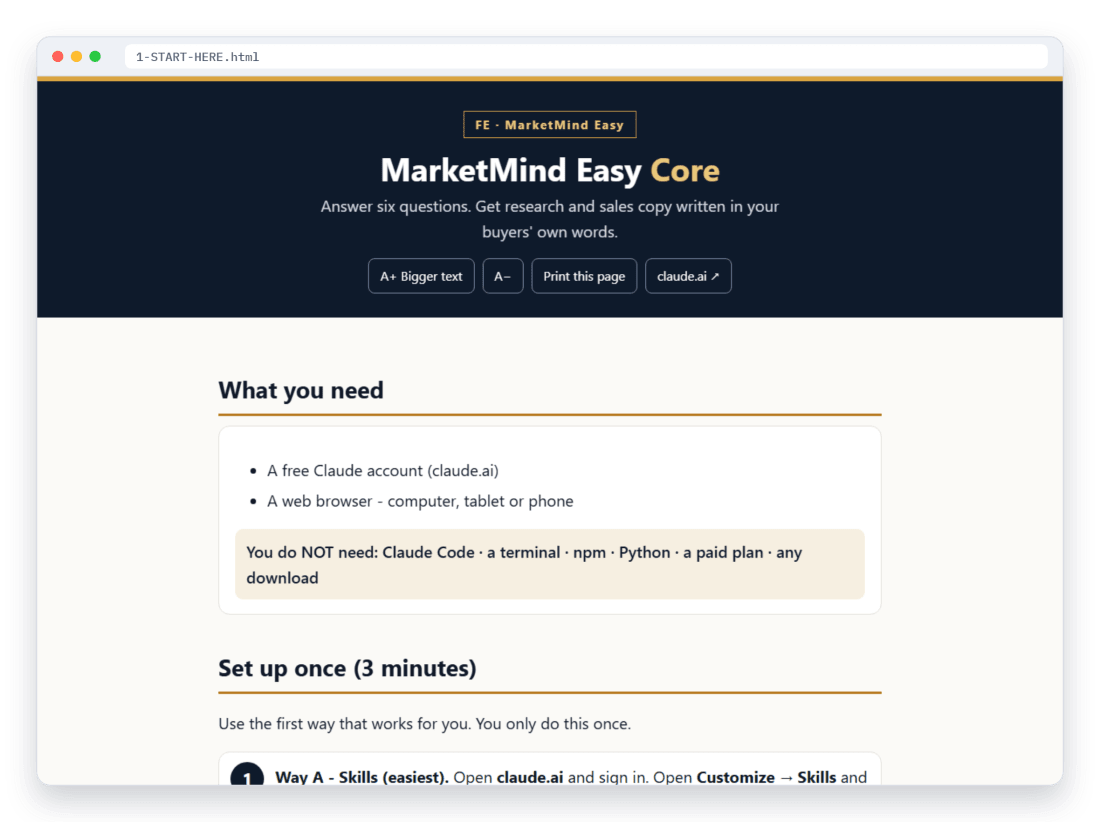
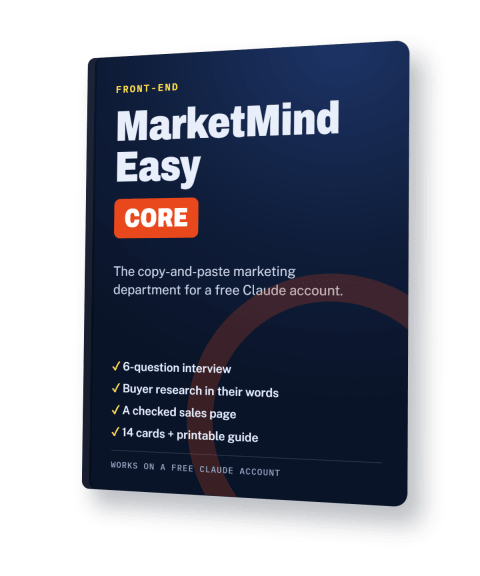
The advertised download contains a start page with COPY buttons, 14 copy-and-paste cards, a shorter three-card route, a finished example, one Claude skill file, a bonus PDF and a printable guide. The vendor bonus PDF includes starter briefs, a launch checklist, a funnel check-up and 25 before-and-after rewrites. These are the vendor’s materials, separate from our ten-tool bonus kit.
That distinction helps set expectations. You are buying a guided workflow rather than an independently hosted application with its own model, research database or publishing service. Your Claude account, browser and product information are essential inputs. There is no API setup advertised, but there is still thinking, checking and editing to do.
Official presentation
Watch the explanation before deciding.
The supplied vendor video introduces the product. Use it to inspect the sequence and the examples being presented, then compare those with what you need for your own offer. A demonstration can clarify the interface and instructions; it cannot establish how your campaign will perform.

Watch the presentation on YouTube ↗
Vendor presentation supplied for this review. We have not independently verified the advertised completion time or reproduced the demonstrated output.
A first-session walkthrough
How to approach the ask → research → write → check workflow.
1. Prepare product facts before opening Claude.
Gather the final format, current price, contents, delivery method, refund policy and permitted uses. If you sell a gardening planner, distinguish the actual printable pages from an attractive cover image. Record whether it can be edited digitally or only printed. If something is unfinished, describe it as unfinished. An AI interview cannot supply a feature that does not exist.
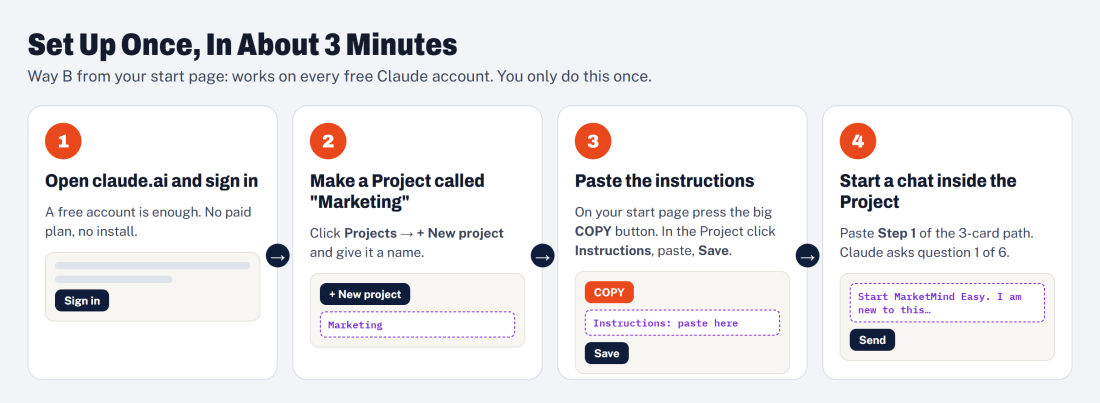
2. Follow the setup and answer the interview honestly.
The sales page directs buyers to paste the instructions into a Claude Project. Anthropic’s current help documentation confirms that Projects are available to free users. Keep the product brief accurate and follow the vendor’s included setup guide; features and usage allowances are controlled by Anthropic. When an answer is unknown, treating it as an open question is preferable to guessing.
3. Examine the research before accepting an angle.
The vendor advertises buyer phrases and competitor analysis. Ask where each observation came from. Open the source, read its context and separate an exact short quotation from the model’s summary. A phrase from a review of a different product may describe a useful concern, but it does not prove demand for yours. If sources are inaccessible, record the limitation and supply your own permission-based observations.
4. Read the draft against the actual product.
Check the headline’s promise, the feature descriptions, the example and the next action. Could a buyer reasonably expect something you do not supply? Does the page explain the format and who it suits? If the AI recommends an angle such as simpler weekly planning, make sure the product genuinely helps with that task. A convincing sentence is still an assertion that needs support.
5. Resolve the flags, then inspect the published path.
The advertised checking step marks uncertain statements. Work through those markers and read the unmarked copy as well. Confirm buttons, disclosures, mobile readability and order details after publishing. Keep a dated copy of your final brief so future emails do not revive an old price or an unsupported promise. Publication is the beginning of observation, not confirmation that the page converts.
Examples, with the right context
Three seller scenarios from the sales page.
These are vendor illustrations, not customer testimonials. The original page explicitly says the scenarios are examples. We include three to explain possible uses; they do not establish customer satisfaction, faster completion or increased revenue.
Make the problem specific.
The wedding-planner scenario contrasts a broad description of an attractive planner with the practical difficulty of tracking bookings. The useful lesson is to connect a genuine feature to a recognizable task. Validate the wording against real buyer observations before adopting it.
Keep the campaign consistent.
The first-time-launcher scenario uses one profile for the page, alternative headlines and launch emails. That illustrates a worthwhile goal: the same format, terms and central promise across the campaign. It does not show that the example seller achieved sales.
Challenge an unsupported promise.
The coaching scenario flags a seven-day result claim. It demonstrates the intended checking behavior. Your own version still needs an achievable service description, accurate evidence and a clear boundary between what you deliver and what the customer may achieve.
Our assessment
Where the approach helps—and where judgment remains essential.
The interview can reveal missing information.
Being asked about the audience and offer is useful when those decisions are still vague. It can expose the difference between “people interested in AI” and “digital product sellers preparing their first sales page.” The narrower description gives a draft something concrete to address. However, six answers do not validate a market. If the profile reveals unanswered questions, research them before treating the recommended angle as settled.
A reusable profile can reduce contradictions.
Consistency is an achievable process goal. A shared source for price, contents and positioning makes it easier to compare your page with an email. The benefit depends on maintenance: update the profile when the offer changes and review regenerated copy. Treat earlier outputs as dated drafts. Reusing a brief without checking its current accuracy can simply distribute the same mistake more widely.
The final check is useful editorial assistance.
We would not repeat the sales page’s absolute assurance that the instructions never allow invented details. The vendor’s own terms acknowledge that AI can make mistakes and assign verification to the user. Instructions can ask a model to flag uncertainty; that is different from independently confirming every sentence. Use the output as a review list and retain your own evidence for claims that matter.
The format is approachable, but completion times vary.
COPY buttons and a printable guide lower setup friction for someone comfortable with a browser. The advertised roughly 20-minute journey should be understood as a vendor estimate. A simple offer with complete facts needs less investigation than an unfinished product or unfamiliar market. Free-account limits, inaccessible sources and corrections can interrupt the process. Plan a real review session rather than scheduling publication around a promised minute count.
Pricing and funnel
Core is $1. Decide on each upgrade separately.
The supplied funnel lists four one-time purchases. LaunchpadJV adds processing or service fees at checkout, so the advertised product price is not necessarily the final amount paid. The page states that Core works without upgrades and that each optional offer can be declined. Review the current order form and terms before completing any purchase.
| Purchase | Price | What changes |
|---|---|---|
| Core | $1 | 14 cards, three-card path, example, skill file, vendor bonus PDF and guide. Own-product use. |
| PRO | $17 | 18 cards and 31 templates for positioning, planning, page reviews and numbers. |
| Campaign Vault | $27 | Swipe lines, industry packs, campaigns, calendars and ten cards. |
| Agency License | $37 | Client-use rights with the advertised client kit and agency resources. |
Explore your product subtotal
Select only the optional upgrades you want. This is a comparison calculator, not a checkout selector.
Core only · checkout fees are additional.
PRO: more planning around the offer.
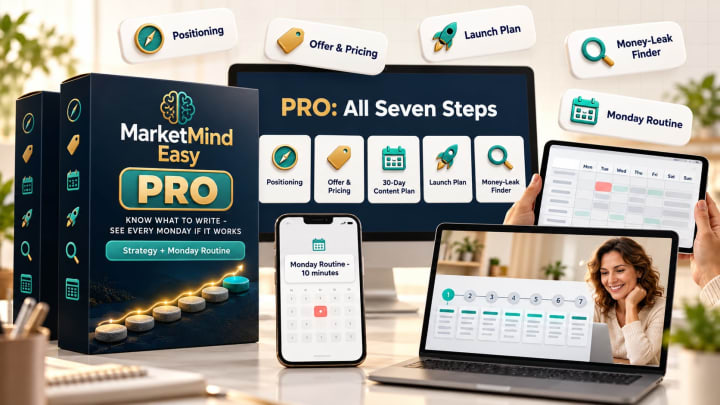
PRO is advertised at $17 with 18 cards and 31 templates. Its scope includes positioning, the offer, a 30-day content plan, a launch plan, a money-leak finder, page check-ups and a Monday numbers routine. Consider it if you need guidance for those surrounding decisions. Core already addresses the checked-page workflow, so an upgrade should correspond to an additional task you actually intend to do.
Campaign Vault: examples and campaign starting points.
Campaign Vault is listed at $27 and adds 500 swipe lines, 12 industry packs, four complete campaigns, 90-day calendars for five channels and ten cards. These are resources to inspect and adapt. A line written for one market may be wrong for your product, and a full calendar is only useful if its subjects fit your audience. Check examples for accuracy rather than assuming volume equals relevance.
Agency License: a rights decision.
The $37 Agency upgrade permits selling the marketing you create to unlimited clients, according to the supplied description. It includes a Word client kit, Excel pricing calculator, example diagnostic and ten agency cards. Core covers your own products and internal business use. If you plan to charge clients for work created with the vendor kit, read the Agency terms first; our companion bonuses do not grant or replace that permission.


Before you add another tool
How does it compare with simply asking Claude?
You can already interview yourself, gather research and give Claude detailed instructions without buying this product. An experienced marketer may have a maintained brief and a checking routine that serves the same purpose. MarketMind Easy’s proposition is packaging that sequence into accessible cards and examples. Judge it on whether the organization helps you complete the work, rather than assuming the underlying AI gains a new capability.
A professional copywriter is a different option. A person can investigate the brief, challenge assumptions and take responsibility for agreed work within a service scope. MarketMind Easy remains a self-directed digital resource. We have not compared its output with commissioned copy or measured time savings. If you need deeper strategic input, research interviews or specialist review, allow for that work separately.
A reasonable fit
- You have a real product and need a clearer briefing process.
- You are comfortable checking sources and editing a draft.
- You want to assess the Core workflow before paying for more resources.
A reason to pause
- You expect independently verified research with no review.
- You need a hosted publishing platform or automatic sales system.
- You want to resell the vendor files or bypass its client-use license.
Included through ePlanetJReviews
Ten companion tools for putting the work into practice.
Our Marketing Implementation Kit adds browser workspaces around the drafting process. You can record evidence, prepare a page, plan a test and inspect numbers using information you supply. The tools have no AI backend and make no live research requests. They work independently; move the relevant notes or exports into your Claude workflow manually.
All ten include editable examples, export options and JSON workspace backup/restore. Record-based tools support editing and deletion. The page builder exports a standalone HTML file for your own hosting. The toolkit passed 127 calculation and browser checks, including example workflows, storage, exports and validation. Those checks describe the companion files only; they do not verify customer results or the vendor’s product.
Price labels below are proposed standalone pricing targets for these original tools. They are not established retail prices or proof of previous sales. All ten accompany a qualifying Core purchase through our affiliate link; no vendor upgrade is required for this bonus kit.
10 of 10 tools shown.
Buyer Evidence Research Desk
Record short buyer phrases alongside their source, date and evidence status. Keep your own interpretation separate from the quotation so a useful observation does not become an invented customer claim. Group entries by pain, desired outcome or objection and export the research brief.
Inputs and limits
You supply: A source URL, checked date, category and interpretation.
No automatic source fetching or verification. Worked examples and workspace backup/restore are included.
Sales Page Publishing Studio
Paste approved copy, benefits, purchase conditions and a valid button destination. Build a responsive preview and download a standalone HTML page. It gives reviewed text somewhere to go without pretending that a draft is already a published funnel.
Inputs and limits
You supply: Approved copy, button URL, current terms and disclosure.
Your hosting, checkout and any opt-in service remain separate. Worked examples and workspace backup/restore are included.
Offer Economics Planner
Calculate contribution after entered refund, fee and affiliate-share assumptions. Compare conversion scenarios, estimated campaign profit and break-even orders. Use it to question an acquisition budget before spending, with the calculation assumptions visible.
Inputs and limits
You supply: One currency, price, fees, refund assumption and traffic assumptions.
Planning arithmetic, not a sales forecast. Taxes are excluded. Worked examples and workspace backup/restore are included.
Conversion Experiment Planner
Choose one variable and two to twelve variants. The planner builds a rotating schedule within a test-unit budget and shows the remaining reserve. Each row has an experiment ID so your notes can identify what was actually tested.
Inputs and limits
You supply: A question, fixed elements, variants, budget and observation window.
No significance testing or causal claims from organic-post differences. Worked examples and workspace backup/restore are included.
Product Proof Builder
Connect proposed claims to a demonstration, sample, document or approved customer statement. Track permission status, intended placement and unresolved work. The report highlights entries that still lack evidence or permission before those assertions reach your sales page.
Inputs and limits
You supply: A product claim, evidence location, permission and next action.
It cannot certify truth, permission or legal compliance. Worked examples and workspace backup/restore are included.
CTA & Destination Inspector
Compare essential promise phrases in an email or video script with the destination copy. Then record manual checks for phone usability, current terms and delivery. This combines a simple literal comparison with the checks that text matching cannot perform.
Inputs and limits
You supply: Campaign copy, visible destination copy and essential phrases.
Synonyms and context require human review; no pages are crawled. Worked examples and workspace backup/restore are included.
Buyer Interview Field Desk
Follow a short interview agenda and record anonymous notes about a real task, previous attempts and purchase criteria. Store the permission scope separately from any exact quote. Export the observations without inventing a composite customer story.
Inputs and limits
You supply: Anonymous code, consent, notes and any accurately recorded quote.
It does not recruit participants, record calls or validate market size. Worked examples and workspace backup/restore are included.
Launch Measurement Dashboard
Paste campaign CSV data to total visits, clicks, checkout events, sales and refunds. Calculate descriptive ratios and revenue after campaign cost. Enter revenue already net of refunds so refunded orders are not deducted a second time.
Inputs and limits
You supply: CSV using supplied headers, comparable periods and one currency.
No live tracking, attribution service or network connection is included. Worked examples and workspace backup/restore are included.
Buyer Objection Evidence Board
Record a real buyer concern, its source, your answer and supporting evidence. Add the limitation that belongs beside the answer and choose a practical priority. Export a brief for your FAQ, sales conversation or next content task.
Inputs and limits
You supply: Observed question, accurate answer, source and evidence.
Priority is your judgment; a hypothesis is not a verified objection. Worked examples and workspace backup/restore are included.
Campaign Link Manager
Create labeled campaign URLs while preserving existing destination parameters. Save an editable link register and export it for campaign use. It helps keep a newsletter link distinct from a social variation without claiming to measure the resulting clicks.
Inputs and limits
You supply: Approved destination, campaign labels and tracking permission.
Confirm your affiliate provider permits extra tracking parameters. Worked examples and workspace backup/restore are included.
Some tasks overlap. The formats are different.
PRO already advertises planning and page check-ups, and Agency includes a pricing calculator. Our tools should therefore be assessed as practical companion workspaces rather than evidence that those tasks are absent from the vendor funnel. They organize manual inputs and produce defined reports or files. They do not replace the vendor’s cards, its complete templates, its strategy guidance or its license.
A useful first session is deliberately small: collect a few actual observations, record the evidence supporting one product claim, and prepare one page. Only after checking that page should you plan a test and enter results. Opening all ten tools at once can create more administration than insight. Start with the workspace that removes the next concrete obstacle.
Bonus eligibility and access
Buy Core through our link. Keep your confirmation.
- Use our purchase button. Complete a qualifying MarketMind Easy Core purchase through the affiliate link on this page. The same ten companion tools are included whether or not you choose vendor upgrades.
- Arrange private verification. Join our WhatsApp group and ask an admin privately about bonus access. Keep your order confirmation available; never post receipts, payment information or transaction details in the public group.
- Download and start. After verification, extract the buyer ZIP and open START-HERE.html in a current desktop browser. Choose a tool, load its example and replace the illustrative information with your own.
Our private verification route is available for requesting the kit; this page does not promise instant automated fulfillment. ePlanetJReviews handles its companion bonuses. The vendor handles MarketMind Easy account or file access, billing, licensing and refunds. Keeping those responsibilities separate makes it easier to direct a question to the right place.
You’re invited to our WhatsApp community.
Join for review updates and bonus announcements. For your bonus request, ask an admin privately so your purchase information stays out of the group.
Join the ePlanetJReviews WhatsApp group ↗You can also visit our review blog for more independent buying guides.
Costs, limits and ownership
Read these details before checkout.
Claude access is separate.
The vendor says a free Claude account is sufficient, and current Anthropic documentation supports free-account access to Projects. Usage, tools and availability remain subject to Anthropic’s plans and limits. Do not assume a fixed reset interval or uninterrupted research capacity. If a session stops, keep your checked brief and continue when access is available. Paid AI access is not included in this download.
You own the responsibility for published claims.
A placeholder such as [NEEDS CHECKING] is a useful signal to investigate. Removing the marker is not the same as resolving the uncertainty. Check features against the actual product, prices against the current order page and testimonials against real permission. Avoid submitting sensitive customer information simply because a prompt requests more context. Anonymous research notes are usually easier to manage.
The files and the output have different rights.
The supplied terms permit publishing marketing you create for your own products. They prohibit sharing, reselling or giving away the vendor’s cards, guides and skill files. Client marketing is addressed by the separate Agency license. Our original companion kit has its own buyer-use terms and does not contain the vendor download. Neither purchase should be interpreted as permission to redistribute the other seller’s work.
The guarantee has a process.
The supplied sales page states a 30-day money-back policy. It asks buyers to contact the vendor with their order identifier and a short account of the problem, allows an attempt to resolve it, and says a refund ends the license and requires deleting the files. It also includes abuse conditions. Read the complete current policy rather than relying only on a guarantee badge.
Questions before buying
MarketMind Easy FAQ
Is MarketMind Easy standalone software?
No. The supplied terms describe a digital download of instructions, cards, examples and guides used within your own Claude account. There is no independently running AI application included.
Do I need a paid Claude plan or an API key?
The vendor advertises use with a free Claude account, without API keys, Claude Code or installation. Anthropic controls the available features and usage limits. Check your own account before depending on a particular research capability.
Do I have to buy PRO, Campaign Vault or Agency?
No upgrade is advertised as necessary for Core’s checked-sales-page workflow. Choose an upgrade for its stated additional resources or rights. Creating marketing for paying clients is the specific reason to examine Agency.
Will the checking step catch every inaccurate claim?
There is no independent evidence here that it will. The vendor’s terms say AI can make mistakes. Check both flagged and unflagged statements before publishing and preserve the sources supporting important claims.
Are the seller stories real testimonials?
No. The original sales page labels them as example scenarios. The three summarized on this page are illustrations of possible uses, with no claim of verified customer outcomes.
Which purchase includes the ten ePlanetJReviews bonuses?
A qualifying Core purchase made through our affiliate link includes all ten companion tools. Vendor upgrades are optional. Ask our WhatsApp admin privately about purchase verification and bonus access.
Do your bonus tools need an AI subscription?
No. Their calculations, reports and exports run locally in a current browser. They use your manual inputs. Hosting is separate if you publish an exported page, and the tools do not include live analytics, AI generation or automatic research.
Can this guarantee sales or search rankings?
No. Neither a structured AI workflow nor our companion tools establishes demand or guarantees conversion, income, search placement or AI citations. Use them to produce clearer work and make better-informed observations.
Our conclusion
Start with one product and a brief you can verify.
MarketMind Easy offers an understandable starting point for sellers who ask AI to write before collecting the facts. Its strongest proposition is a repeatable order: ask about the offer, investigate the buyer, produce a draft and inspect the claims. That sequence is worth examining when your current process consists of rewriting generic first drafts.
Core’s low advertised price makes it possible to assess that organization without committing to every upgrade, although checkout fees still matter. Choose the broader packages for a defined need. Use our companion kit to preserve evidence, publish reviewed copy and measure what happens next. Begin with a realistic task you can finish and evaluate, rather than a promise that more AI material will create a business by itself.
Core + our ten-tool companion kit
Start with the $1 advertised Core offer, plus checkout fees. Review the terms and choose upgrades only if they fit.
Get Core + all 10 bonusesAffiliate link · bonus access after private verification.
Sources and review basis
- MarketMind Easy official sales page and on-page terms · supplied HTML and funnel information, reviewed 29 October 2026.
- Vendor partner page · product-line details supplied for this review.
- Anthropic: creating and managing Projects · checked 29 October 2026 for free-account availability.
- ePlanetJReviews Marketing Implementation Kit v1.0 · original source, formula checks and Chromium workflow tests. The kit is separate from MarketMind Easy.
Prices, features and policies can change. Check the current vendor order form and license. Promotional images and the presentation are supplied by the vendor. No customer ratings or purchase-performance claims have been inferred from the example scenarios.